Off-Grid Messaging with MeshCore: How to Text When the Cell Towers Go Dark
· 25 min read
A beginner's guide to MeshCore LoRa mesh radios: how they work, which hardware to buy, and how to fix the classic problem where you can hear the mesh but it can't hear you.
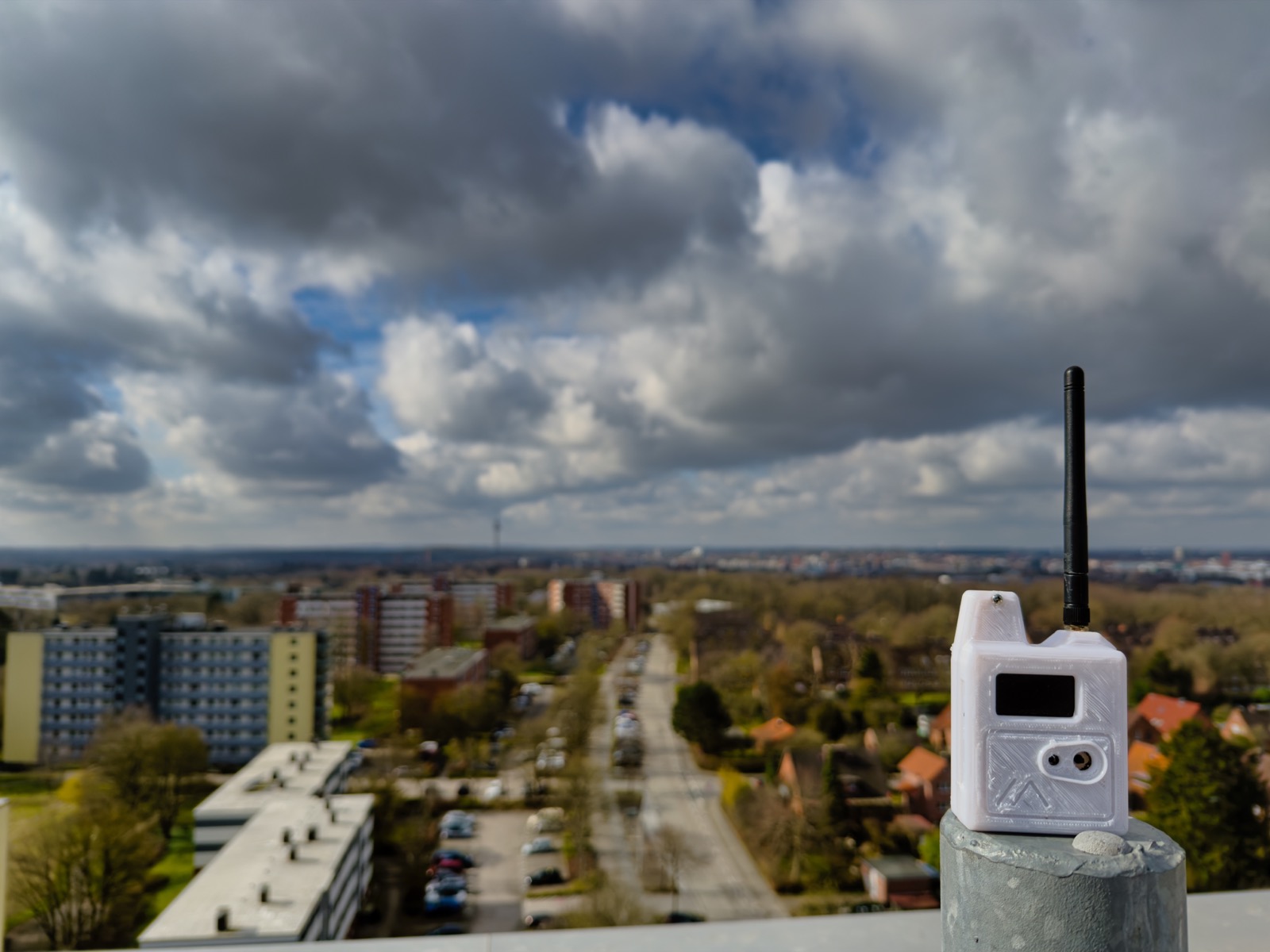 A Seeed Wio Tracker L1 Pro, a ~$45 MeshCore starter radio, keeping watch over a German skyline. Photo: Fabian Horst, CC BY 4.0.
I have a weakness for radios that nobody needs permission to use. In a previous life, I braved 5°F winter days scanning public Wi-Fi all over downtown Helsinki, warmed by nothing but spiked glögg. Wi-Fi taught me that a little unlicensed spectrum and a lot of clever engineering can change the world. Ham radio taught me that the best communications gear is the kind that still works when everything else has given up. So when I found a $40 radio that could text people miles away, with no towers, no SIM card and no license, I had a new hobby before I'd finished reading the product page.
It also exposed a blind spot in my emergency kit. Water: check. Forty pounds of freeze-dried lasagna: check. Hand-crank flashlight that doubles as a phone charger: check. And under Communications, a phone. A phone that is, in practice, a very expensive flashlight once the nearest cell tower loses power.
Off-grid mesh networking fills that gap: cheap long-range radios that form their own text network, with no carrier in sight. I spent the past couple of months on the Bay Area's MeshCore network with a handful of radios, one SDR dongle, and more patience than I knew I had. For ten frustrating days I could hear the whole mesh, and it couldn't hear me. This guide covers what I wish I'd known on day one: why people do this, how MeshCore works, what to buy, and how to fix the problem almost every beginner hits.
1. Why Are People Doing This?
Because the grid has a habit of blinking
Modern communication is a long chain of things that need electricity and a business model: towers, backhaul fiber, data centers, and the goodwill of your carrier. Break any link and your $1,200 slab of glass is reduced to playing the offline games you never installed.
After Hurricane Helene in September 2024, parts of western North Carolina lost power and cell service for days, in places for weeks. In April 2025, the Iberian blackout took mobile service down across Spain and Portugal within hours, once tower backup batteries ran dry.
In the Bay Area, I don't have to imagine it. We have earthquake faults under our feet and fire seasons that bring planned PG&E power shutoffs. On October 27, 2019, high winds, a forest fire and a PG&E shutoff took out my power, internet and cable TV all at once. The Mercury News wrote about it, and I ended up building a cardboard-and-tinfoil antenna to watch Sunday football over the air.
Mesh radios don't care. They run for days on a small battery, indefinitely on a palm-sized solar panel, and relay messages through each other instead of through a tower.
The non-apocalyptic reasons
- Outdoors and events: hikers and sailors beyond the last bar of signal, and festivals where 50,000 people crush the cell network.
- Community resilience: neighborhoods putting solar repeaters on rooftops as a permanent backup network.
- Privacy: a network you own, with no carrier logging your metadata.
- Fun: honestly the big one, and my reason. It's ham radio for people who'd rather flash firmware than memorize Morse code, and you don't need a license.
2. LoRa and Mesh: A Short Primer
LoRa: long range, low everything else
First, a naming hazard. LoRa (lowercase a, "Long Range") is a radio modulation owned by Semtech. It has nothing to do with LoRA, the AI fine-tuning trick. I spend a lot of time around AI people, and I can confirm that search engines find this hilarious.
LoRa uses chirp spread spectrum: each symbol is a tone sweeping across a slice of spectrum. Because the receiver knows the shape of the chirp, it can dig a signal out from below the noise floor. That's how a radio putting out about as much power as a phone's Wi-Fi reaches miles instead of yards.
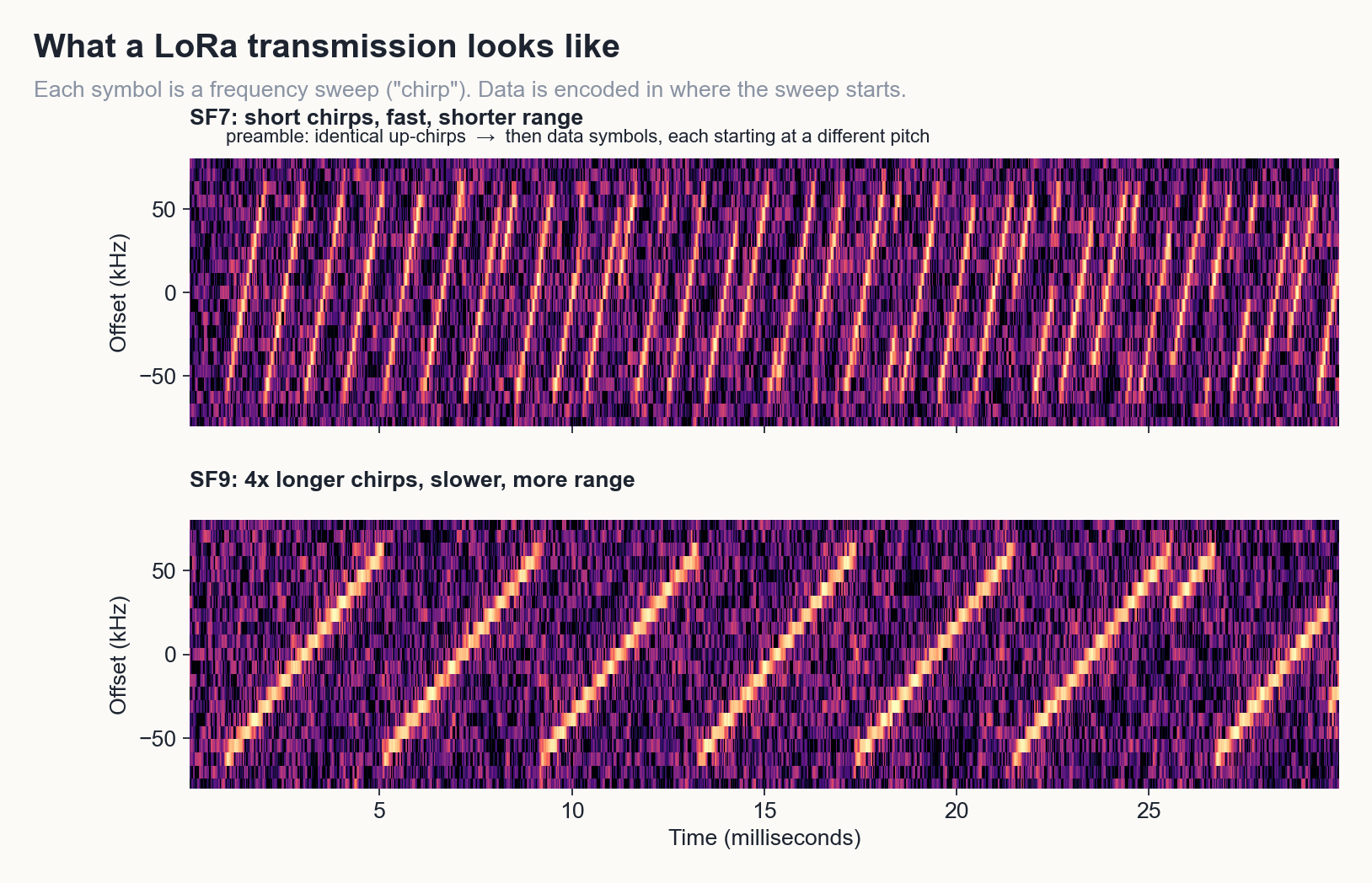 LoRa symbols are frequency sweeps, or "chirps." Higher spreading factors use slower chirps, trading speed for range.
The trade-off is bandwidth: a few hundred bits to a few kilobits per second. Enough for a text or a GPS position, never enough for a photo of your dog. LoRa runs in unlicensed ISM bands: 915 MHz in the Americas and Australia/New Zealand, 868 MHz in Europe and the UK. Sub-gigahertz signals pass through trees, walls and San Francisco fog far better than Wi-Fi. Karl the Fog is not the problem. The hills are.
Mesh: everyone is the tower
A cell network is a star: lose the tower and everyone in range goes silent. A mesh has no center. Radios pass messages along, hop by hop, until they arrive.
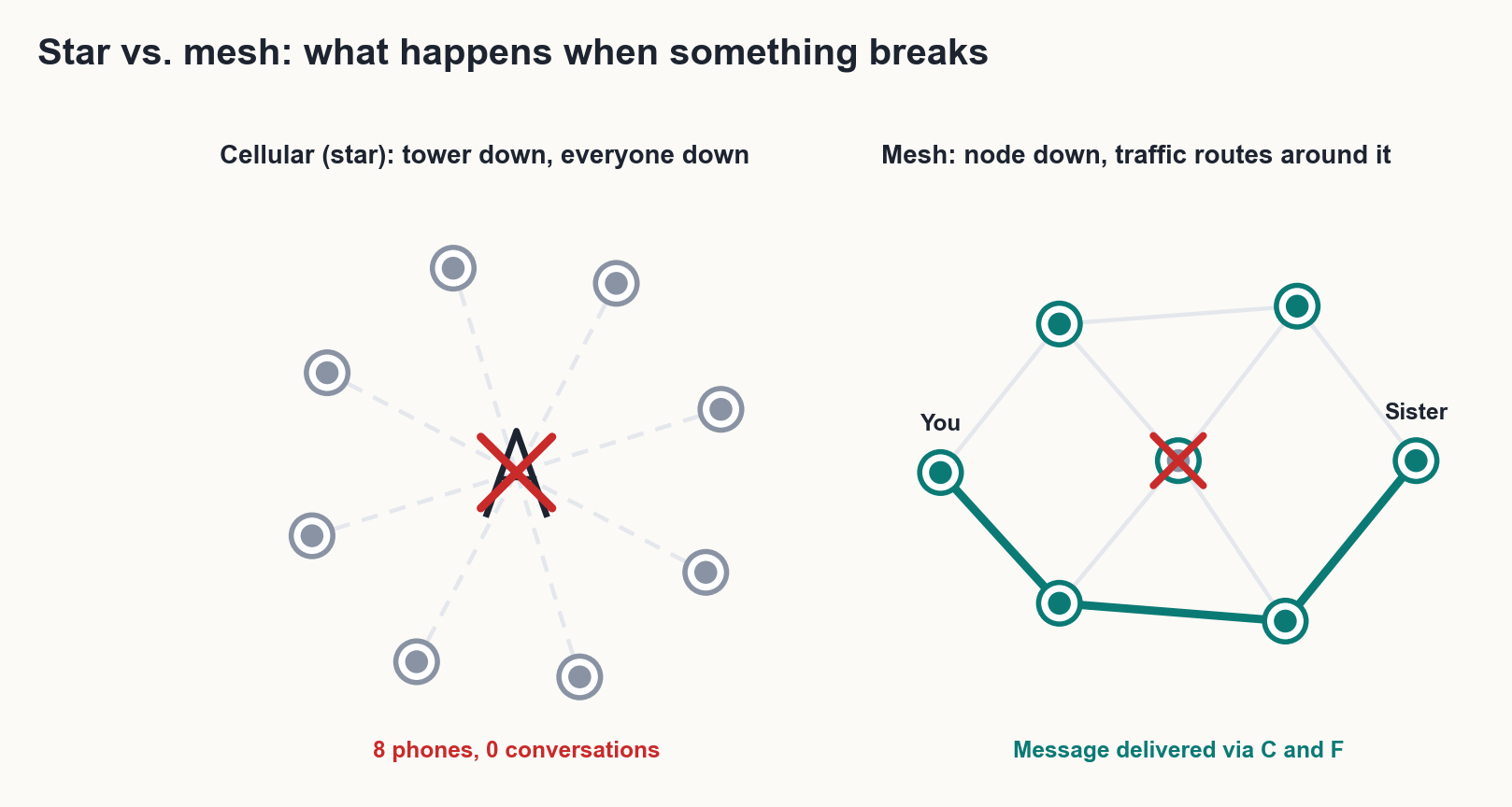 Left: lose the tower, lose everyone. Right: lose a node, and messages route around it.
Where it fits among the radios you know
Cellular and Wi-Fi depend on someone else's infrastructure. Ham radio doesn't, but it takes an exam, real skill, and (in most countries) a ban on encryption. LoRa mesh is what I'd hand to my non-radio-nerd family: no license, encrypted, days on a battery, and it looks like a messaging app.
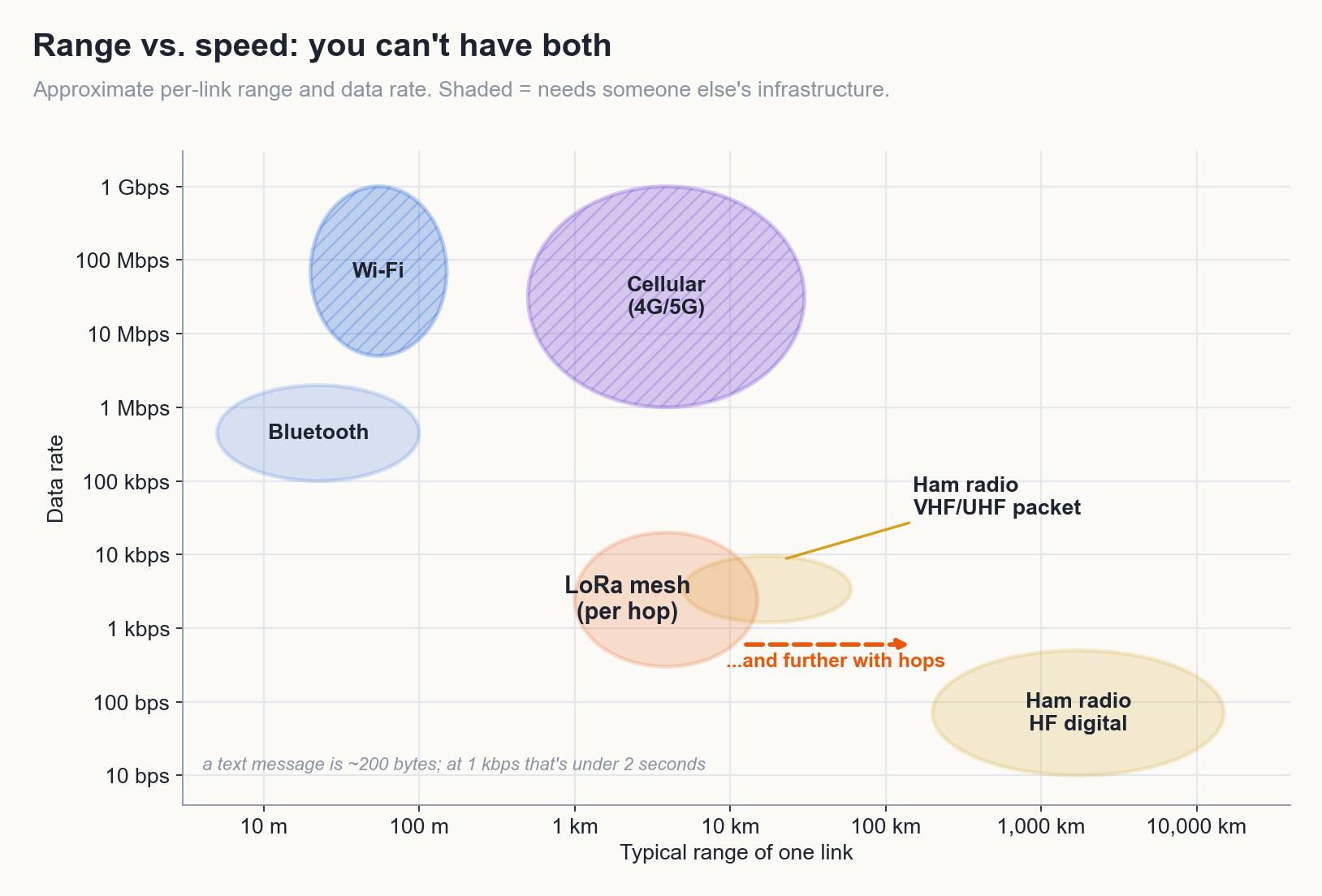 Every radio trades bandwidth for range. LoRa sits firmly at the far end: very far, very slow.
3. Meshtastic vs. MeshCore, and Why I Chose MeshCore
Both big projects run on the same cheap LoRa boards. They're different firmware with opposite ideas about who should relay.
- Meshtastic is the big, friendly one, with the largest community and the most polished apps. Every radio relays every message, up to 7 hops. Two radios out of the box just work. The catch: in a dense city, hundreds of pocket radios rebroadcasting everything eat the airtime.
- MeshCore is the younger, more opinionated challenger. Your pocket radio never relays. Fixed repeaters on rooftops and hills do all of it, and after the first message, traffic follows a learned route instead of flooding. It scales to whole regions. The catch: somebody has to climb onto a roof. (Two MeshCore radios in range of each other can still talk directly.)
| Meshtastic | MeshCore | |
|---|---|---|
| Who relays | Everyone | Fixed repeaters only |
| Routing | Managed flooding | Flood once, then direct |
| Max hops | 7 (default 3) | 64 |
| Needs fixed repeaters? | No, but they help | Yes, really |
| Dense cities | Struggles | Scales well |
| Offline messages | Limited | Room servers |
| Internet bridging | Built-in MQTT | Not built in (on purpose) |
| Learning curve | Gentle | Moderate |
| Best for | Groups on the move, first-timers | City- and region-wide networks |
The honest verdict: for a group that moves around together and wants something that works out of the box, pick Meshtastic. If your city has MeshCore repeaters, or you want to help build permanent regional coverage, pick MeshCore.
Around the Bay, the second case is winning.
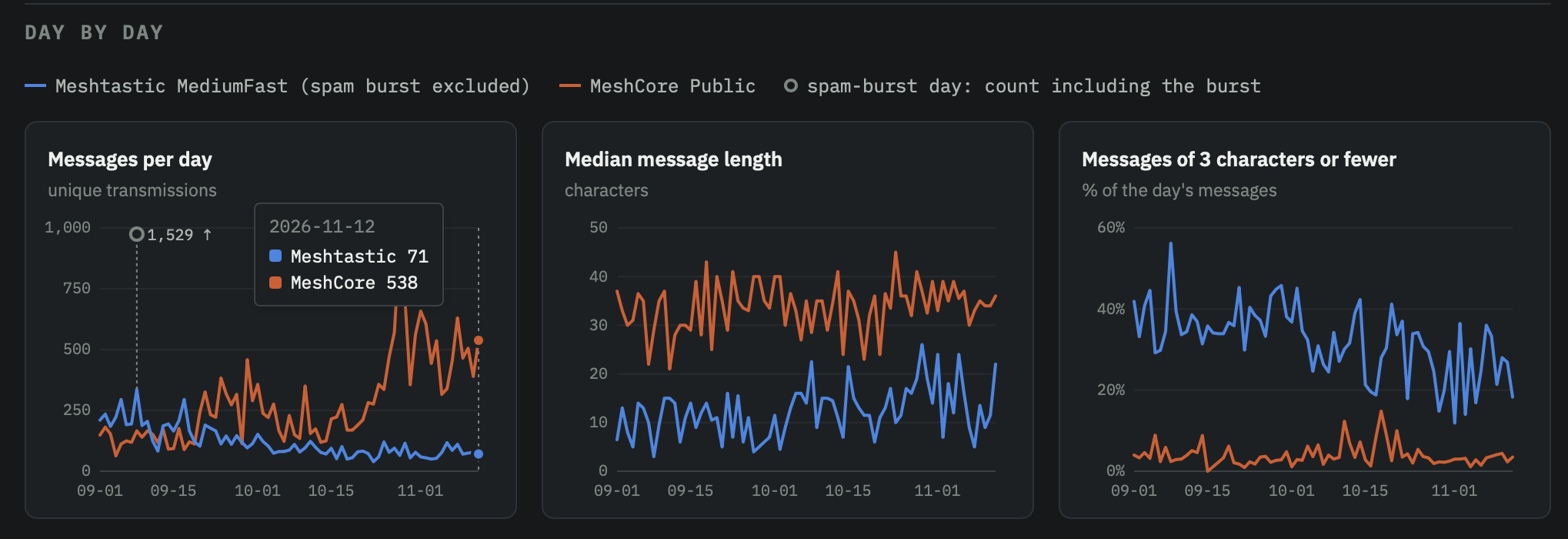 Bay Area traffic, day by day. By mid-November the MeshCore Public channel carried 538 messages in a day against 71 on Meshtastic's MediumFast. MeshCore messages were also longer, and far less likely to be a three-character "hi" or "test." Data: a Bay Area MeshCore member who runs nodes on both networks. It counts only what their nodes heard, so treat it as one listener's view rather than a census.
That's what a mesh looks like when it delivers reliably enough for real conversation. The Bay Area MeshCore crowd has put hundreds of repeaters on rooftops, hilltops and the occasional tree. One of my test messages was heard by 66 of them, across a span of 238 miles. The two networks can't talk to each other, so the right choice is whichever one your neighbors run. Mine run MeshCore.
4. How MeshCore Works: The Journey of a Message
MeshCore's design fits on a napkin. There are three kinds of node:
- Companions are personal radios: a handheld with a keyboard, or a little board paired to the MeshCore phone app. They never repeat anyone else's traffic.
- Repeaters are fixed, usually solar-powered, and do all the relaying.
- Room servers are bulletin boards that hold messages for people who were offline.
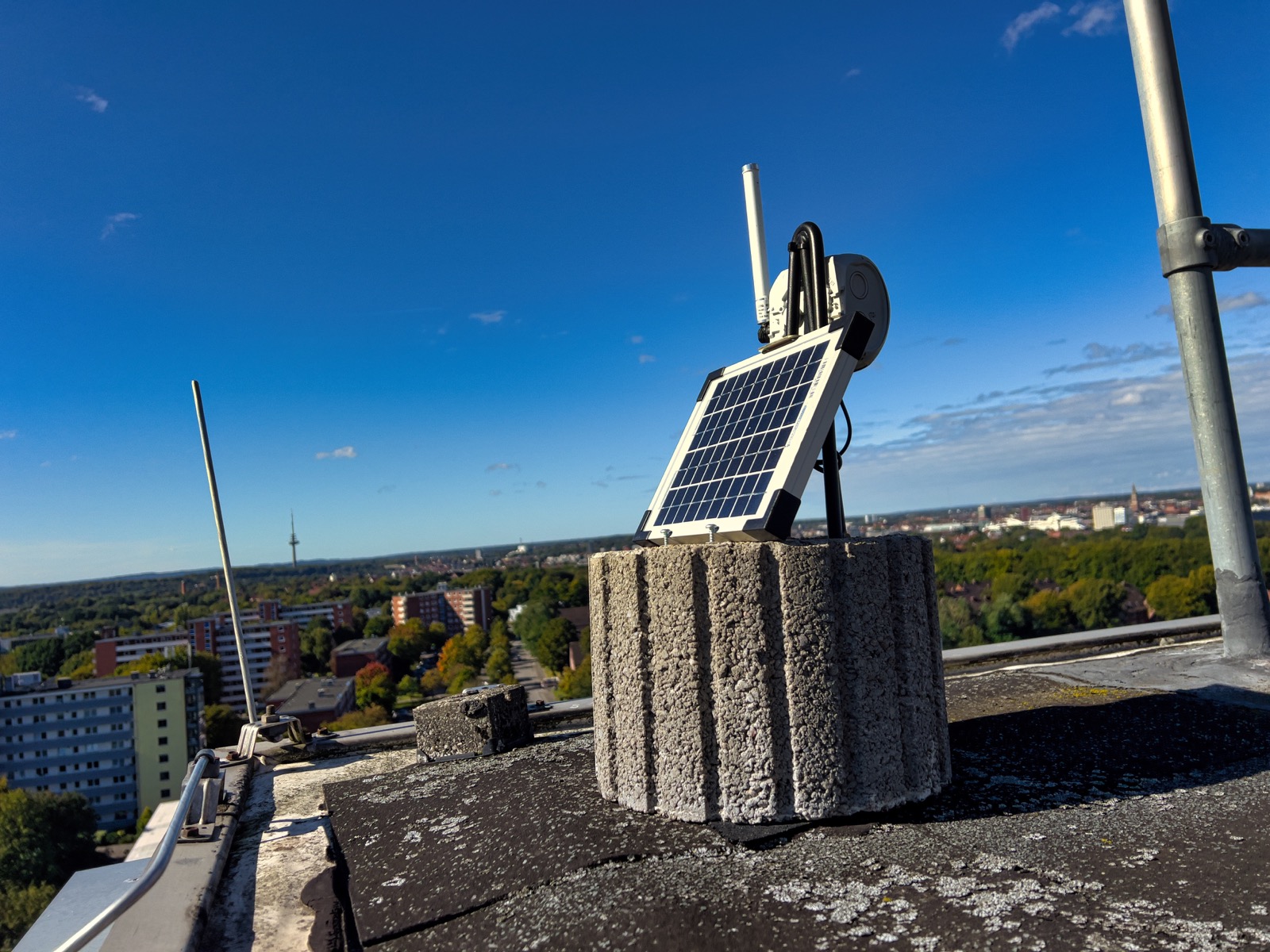 A MeshCore repeater in its natural habitat: a RAK4631 board, a small solar panel, an antenna, and a concrete block to stop it blowing away. Photo: Fabian Horst, CC BY 4.0.
Every node has a cryptographic key pair, and the public key is its identity: no accounts, servers or phone numbers. Nodes introduce themselves with an advert, a signed packet carrying their public key, a name, and optionally a location. Repeaters advert every 12 hours. Companions advert only when you tell them to, so press that button when you're new, or nobody will know you exist.
Every message is one small packet
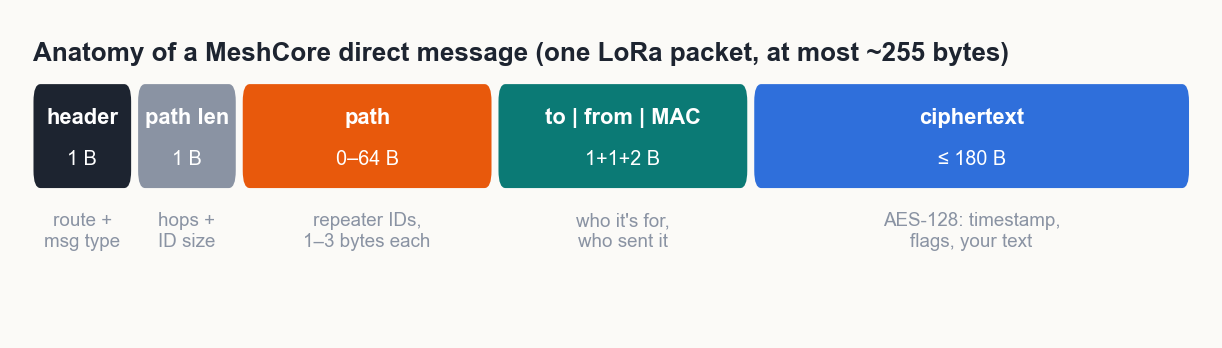 One LoRa packet: a 1-byte header, the path, and an encrypted payload. A repeater's "address" in the path is just the first byte (or two, or three) of its public key.
A flood packet gets repeated by anyone who hasn't already; a direct one only by the next repeater on its path. Repeaters forward your words but can't read them.
Alice texts Bob
Alice in Berkeley texts Bob in San Jose. Both have advertised, so each has the other's public key.
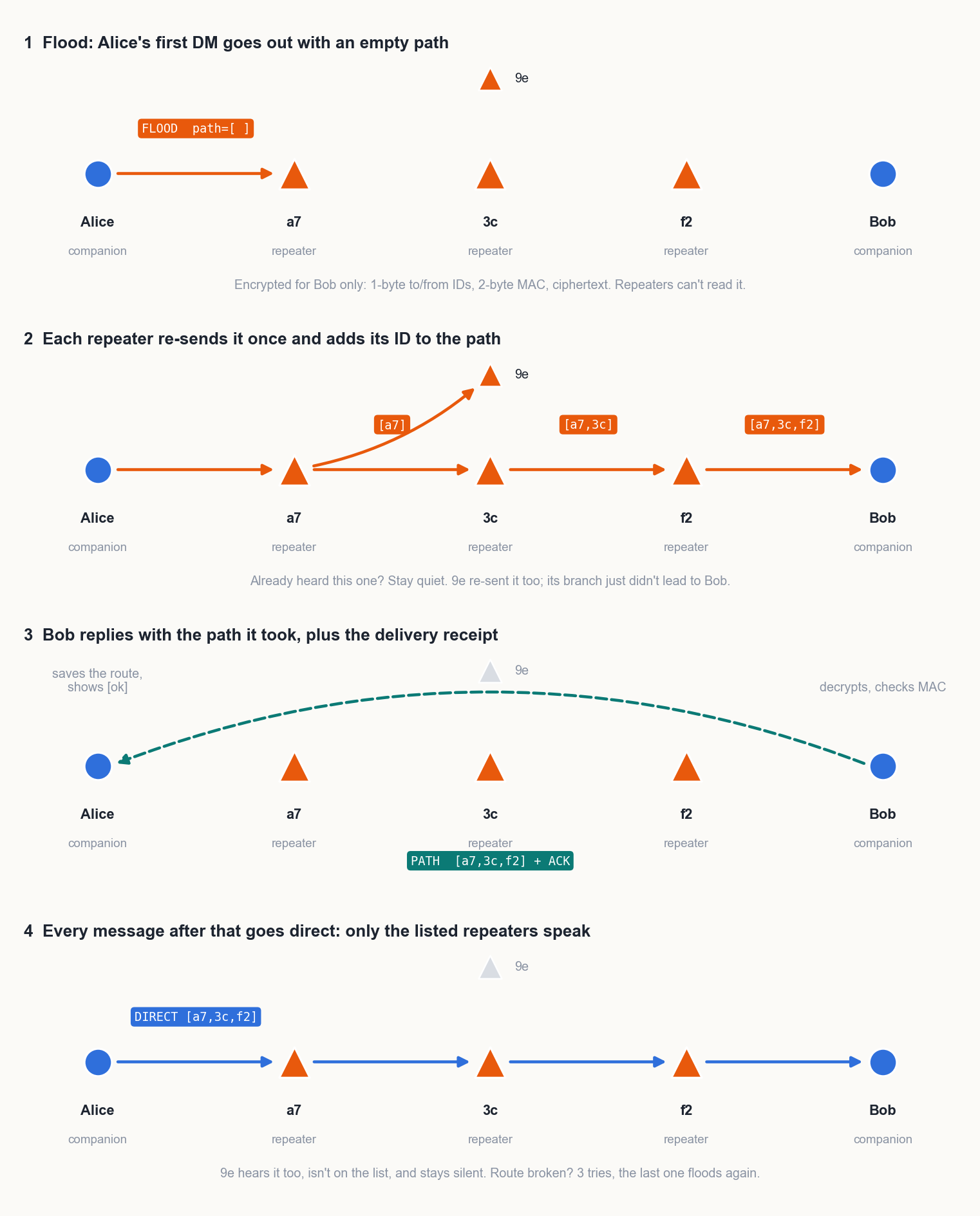 The first message floods and records its route. The reply carries that route home. After that, only the repeaters on the route transmit.
- Encrypt and flood. Alice's radio combines her private key and Bob's public key into a secret only the two of them share, encrypts the text with AES-128, adds a short authentication tag, and sends it as a flood with an empty path.
- Repeaters relay once and sign the guest book. Each repeater that hears the packet checks whether it has seen it before. If not, it waits a short random moment (longer if the signal was weak, so strong links win the race), appends its own ID to the path, and re-sends. The ripple dies out on its own, because nobody repeats a packet twice.
- Bob answers with the map. Bob's radio decrypts the message and sends back a returned path: the list of repeaters the message took, with the delivery receipt tucked inside. Alice's screen shows "delivered," and her radio saves the route.
- Direct from now on. Alice's next message carries that route in its header. Repeaters not on the list stay silent, even if they heard every byte. One message now costs a handful of transmissions instead of a regional flood.
If the route breaks (say, a repeater loses power), Alice's radio retries three times and floods the last attempt to find a new route.
Group channels always flood, because "everyone in #test" has no single destination. A channel is just a shared key. Public uses a well-known key, and a #hashtag channel's key is derived from its name, so anyone who guesses the name can read along. Treat both as billboards.
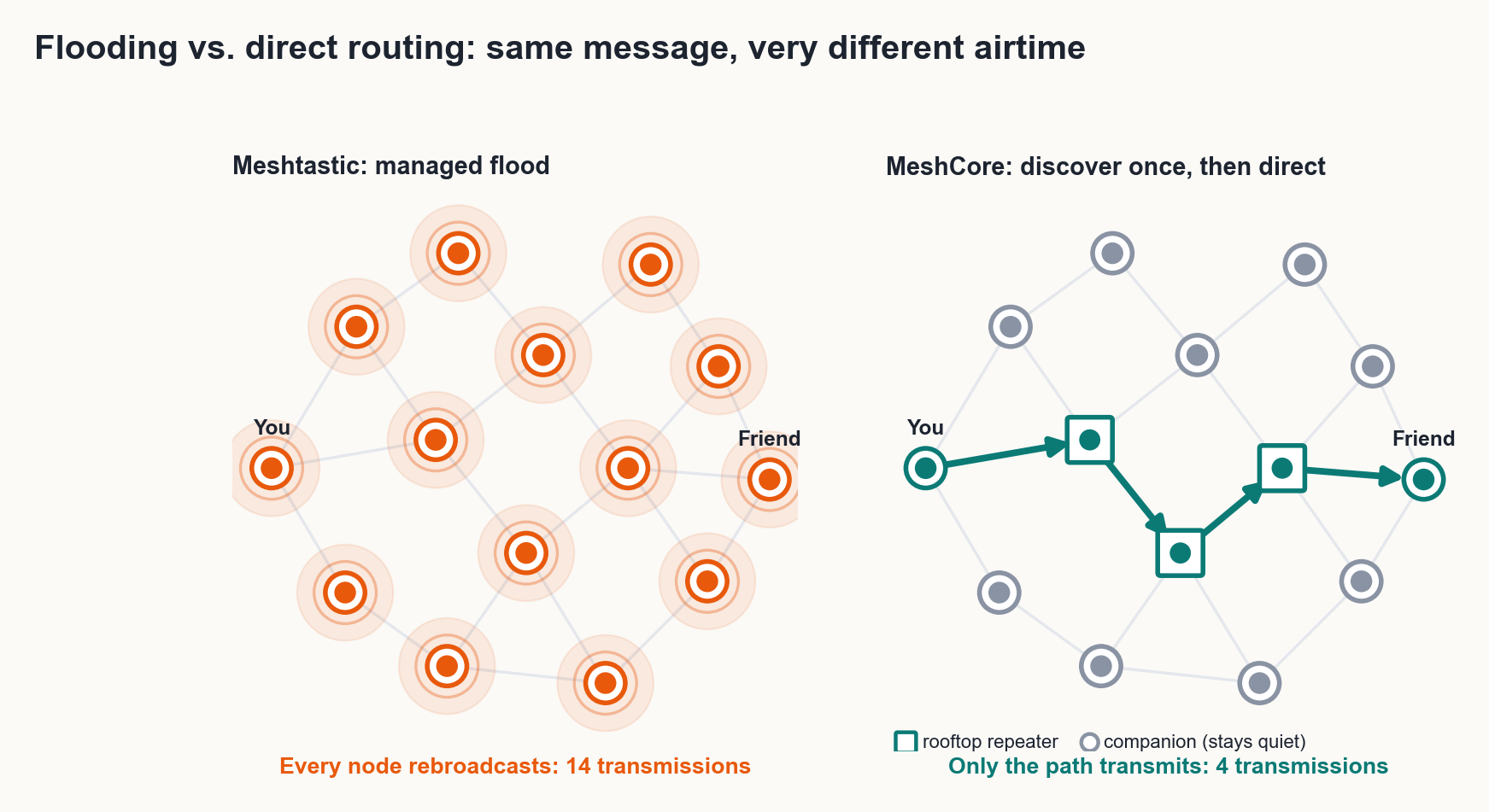 Meshtastic (left) floods every message through every node. MeshCore (right) floods once to find a path, then sends along that path only.
Two honest caveats. The cryptography is lean (tiny authentication tags, no forward secrecy): fine for a camping trip, not for a nation-state threat model. And with only 256 possible 1-byte repeater IDs, busy regions get collisions, which is why the Bay Area mesh is moving to 2-byte IDs.
5. Choosing Hardware and Software for MeshCore
Lessons from my own drawer of radios
Check official support before you buy. My first rig was an M5Stack Cardputer ADV, a credit-card-sized computer with a keyboard, plus the snap-on Cap LoRa-1262 radio with GPS. Meshtastic supports it officially. MeshCore didn't, so I ended up writing my own MeshCore firmware for it (it's on M5Burner as Bruce's MeshCore, if you have one). Fun hobby, not a beginner's path. Before buying anything, find your board in the MeshCore web flasher. If it isn't listed, you're on your own.
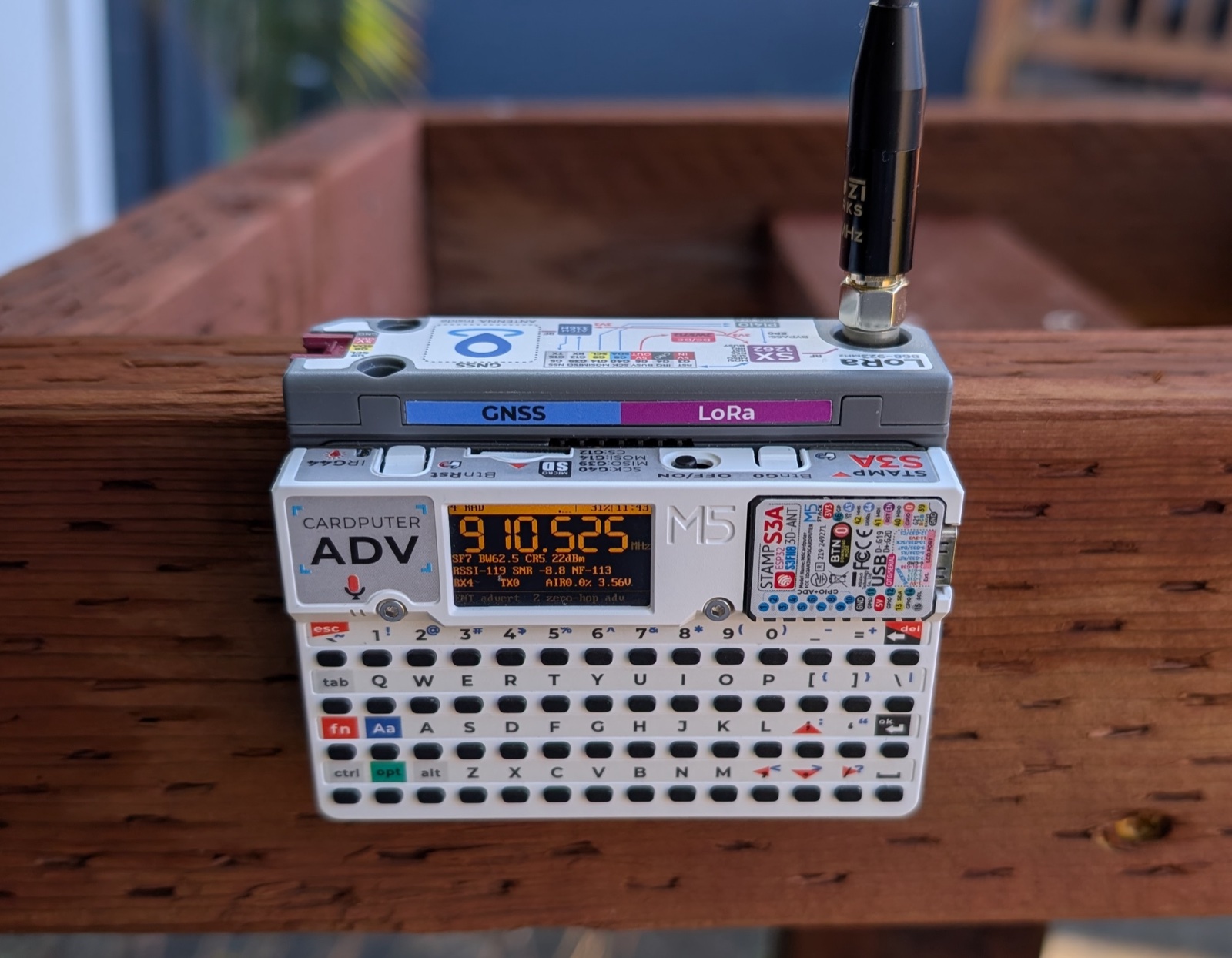 My Cardputer ADV with the Cap LoRa-1262. Lovely to tinker with, but not my pick for a first MeshCore radio.
Decide how you want to type. Bluetooth companions are small boards paired to the MeshCore phone app: cheap, simple, and the app is good. But your phone becomes part of the system, and in a real outage you'll want its battery for other things. Standalone devices have their own screen and keyboard and need no phone at all. That's what I'd want in a go-bag.
Battery life depends on the chip. Radios built on Nordic's nRF52 chips sip power, often running a week or more on a small battery. ESP32 radios are more capable but hungrier: with the screen off, my Cardputer draws 120–150 mA, so its 1,500 mAh battery lasts 10–12 hours, not days. For something that sits in a bag listening, nRF52 wins.
GPS costs more than battery life. On my radio, the running GPS receiver raised the LoRa noise floor by about 4 dB, making it measurably deafer. Keep GPS off unless you actually need your position.
Newest isn't always best. I tested a brand-new radio built on Semtech's fourth-generation LR2021 chip (most radios use the second-generation SX1262). On a cheap SDR dongle it showed two problems: it sent the start of each packet about 25 dB too quietly, and it sat 23 kHz off frequency. The first turned out to be a firmware bug, which I've since patched in my own build. The second happens because the board has no TCXO (a temperature-compensated crystal), which matters on MeshCore's narrow 62.5 kHz channels. Prefer boards with a TCXO, and let other people beta-test the shiny new silicon.
Get an external antenna connector. You'll want to upgrade the antenna (see section 7), so look for SMA or RP-SMA, not a tiny internal antenna.
Buy two radios. It sounds greedy, but a second, known-good radio is the best diagnostic tool you'll ever own. It's how I proved my problem wasn't my hardware.
My recommendation: LilyGO T-Deck Plus
If I were starting over, I'd get a LilyGO T-Deck Plus with the community-built WadaMesh firmware, which is much nicer to use than the official T-Deck build. It looks like a BlackBerry that took up survivalism: thumb keyboard, trackball, 2.8-inch touchscreen, GPS, a 2,000 mAh battery and an SX1262 radio with a TCXO. No phone required. It was also my known-good reference through every test in this article.
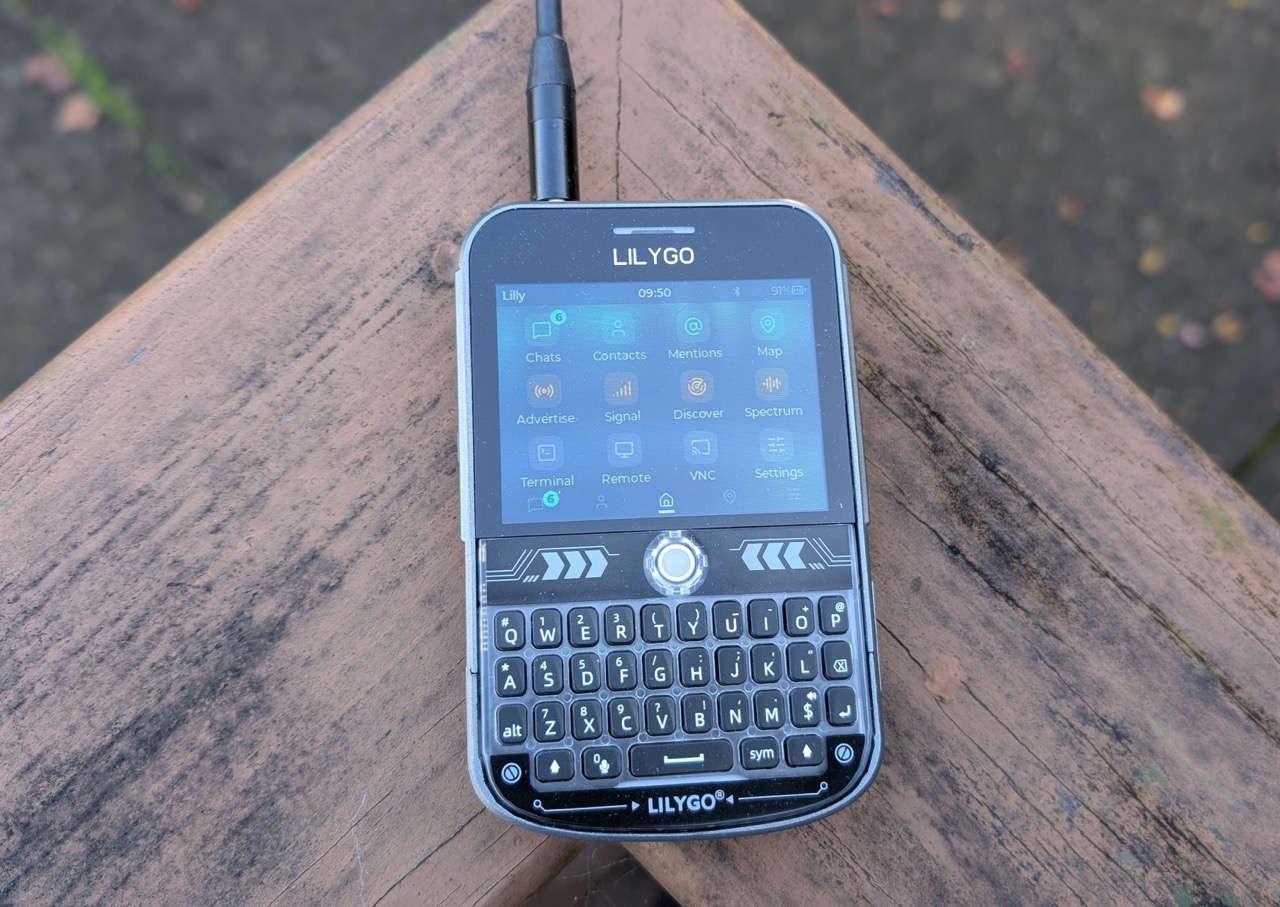 My T-Deck Plus running WadaMesh: thumb keyboard, trackball, touchscreen, GPS, and no phone required.
Buy the right band for your region: 915 MHz for the Americas and ANZ, 868 MHz for Europe and the UK. Buying the wrong one is the hobby's most common rite of passage.
For everything else, start from the Bay Area MeshCore recommended devices list. It's written by the people who run the repeaters and is refreshingly honest about weak spots. Condensed, with my pick on top:
| Device | Type | Approx. price | Why you'd pick it | Keep in mind |
|---|---|---|---|---|
| LilyGO T-Deck Plus | Standalone | ~$60–85 | My go-bag pick. Keyboard, screen, GPS, battery; no phone needed. | ESP32, so shorter battery life. |
| Seeed Wio Tracker L1 Pro | Companion | ~$45 | Best-value starter: screen, GPS, battery, external antenna. About 5 days per charge. Ships with MeshCore. | 3D-printed case, not waterproof. Upgrade the antenna. |
| Meshnology N39 (Heltec V4 kit) | Companion | ~$45–55 | Complete kit with case, GPS and OLED. Strong transmit power, which helps you get heard. | ESP32, so shorter battery life. Not waterproof. |
| LilyGO T-Echo | Companion | ~$45–65 | The classic: e-ink screen, great battery life, lots of community know-how. | Weak stock antenna, small battery, fragile buttons. |
| Seeed SenseCAP T1000-E | Companion | ~$40 | Credit-card size, IP65 sealed. | Not a first device. Sealed antenna hears well but struggles to be heard. |
| Seeed SenseCAP Solar Node P1-Pro | Repeater | ~$90 | 5 W solar panel, big battery, reportedly two weeks without sun. | Swap the 2 dBi stock antenna. Not IP-rated. |
| RAK WisMesh Repeater Mini | Repeater | ~$99 | Most weatherproof: IP67 throughout. | Smaller panel and battery. RP-SMA connector. |
Prices from the Bay Area MeshCore list, last updated March 2026. Most of these ship with Meshtastic; flash MeshCore once when it arrives.
Notice the pattern: almost every entry says "upgrade the antenna." It's usually the single biggest improvement you can make, and the first fix for the lopsided-link problem in section 7. Check that the connector (SMA, RP-SMA or N-type) matches your device, or order an adapter too.
Pro tip: never power on a LoRa radio without an antenna attached. Transmitting into nothing can fry the radio chip, a lesson almost everyone learns once.
6. Getting on the Air
Step 0: Find your locals
MeshCore lives or dies by repeaters, so check there's a network before you spend a cent.
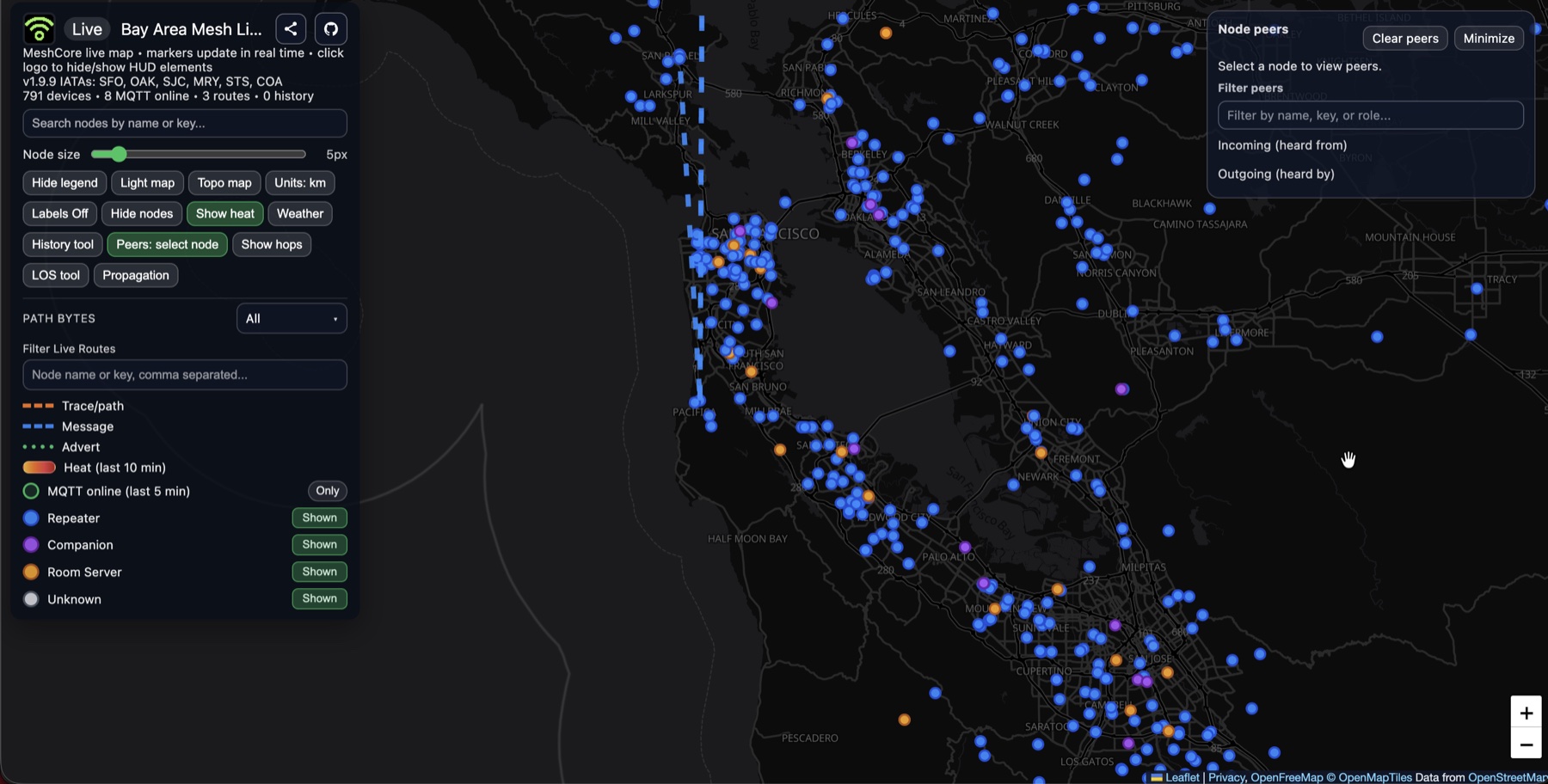 The Bay Area MeshCore live map: 791 devices, mostly repeaters (blue), plus room servers (orange) and companions (purple).
- The official MeshCore map shows repeaters and room servers near you.
- Find your local group and use their radio settings. If your preset doesn't match your neighbors', you won't hear a thing. Mine is Bay Area MeshCore: device recommendations, setup guides, a channel list, live maps, a network health check, and a Discord full of people suspiciously happy to answer beginner questions. Most metro areas have one; search for "[your city] MeshCore".
- No repeaters nearby? Then you're putting up the first one, or Meshtastic may suit your area better for now.
Step 1: Flash and say hello
A few radios, like the Wio Tracker L1 Pro, arrive with MeshCore installed; most ship with Meshtastic. Either way, flash the latest release. No soldering and no compiler, just a USB cable and Chrome. Open flasher.meshcore.io, pick your board, and pick a role: Companion for your pocket radio, Repeater for the roof. Bluetooth companions then pair with the MeshCore phone app.
Set your region preset (this is the legal part, so don't skip it), press advert so others can find you, and send your first message. Mine was "Hi" on Public. Nobody replied to this clueless newbie. As it turned out, nobody had heard him.
Step 2: Be a good neighbor
- Ask before you add a repeater. A badly configured one adds flood traffic for everybody. Local groups have conventions for names, advert intervals and IDs.
- Keep Public for people. Test on #test, and don't advert on a timer.
- Stay legal. Use your region's preset and respect its power limits. In the US, once your antenna gain passes 6 dBi, the allowed transmit power goes down, not up.
- Contribute. The best thing you can do for a MeshCore network is put a solar repeater somewhere high. The second best is answering a beginner's question.
7. "I Can Hear Them, but They Can't Hear Me"
This is the most common beginner problem in MeshCore. It cost me ten days.
Your radio fills up with repeaters and messages. But anything you send disappears: channel messages never come back as repeats, DMs never show as delivered, and nobody replies. It feels like a broken transmitter. It almost never is.
Why the link is lopsided
Radio paths work the same in both directions, but the two ends of the link don't:
- Repeaters shout, you whisper. Some repeaters run 1-watt amplifiers and big antennas on hilltops. Your handheld puts out about a sixth of that through a stubby antenna at waist height.
- Repeaters live in a noisy neighborhood. A hilltop hears every gadget, smart meter and radio in the valley. Its noise floor is higher than your quiet room's, so your weak signal has more to cut through.
- Listening is easy, being heard is hard. You only need to hear one of the dozens of repeaters around you to see traffic. To get a message out, at least one of them has to hear you.
- No neighbors to help. In Meshtastic, a nearby handheld might relay for you. In MeshCore, it's a repeater or nothing.
The upshot: being 4–6 dB short of the nearest repeater is enough to lose most of your sends. That's less than the difference between your desk and your window.
How I proved it wasn't my radio
Like any engineer, I blamed my gear and spent a week swapping settings, firmware and suspicions about every component on the board. Two things finally cracked it.
First, a known-good reference. I bought a T-Deck Plus, and it failed from my house too. Then I used a cheap RTL-SDR dongle as a crude power meter, with both radios taking turns on the same marked spot. My Cardputer was never weaker than the T-Deck.
Second, a hill. From a hillside, the same radio heard about 30 repeaters instead of one. Every message got through, and it scored 84–87% on the Bay Area health check, which counts how many of the region's listening stations hear your message. The T-Deck scored 82% from the same spot.
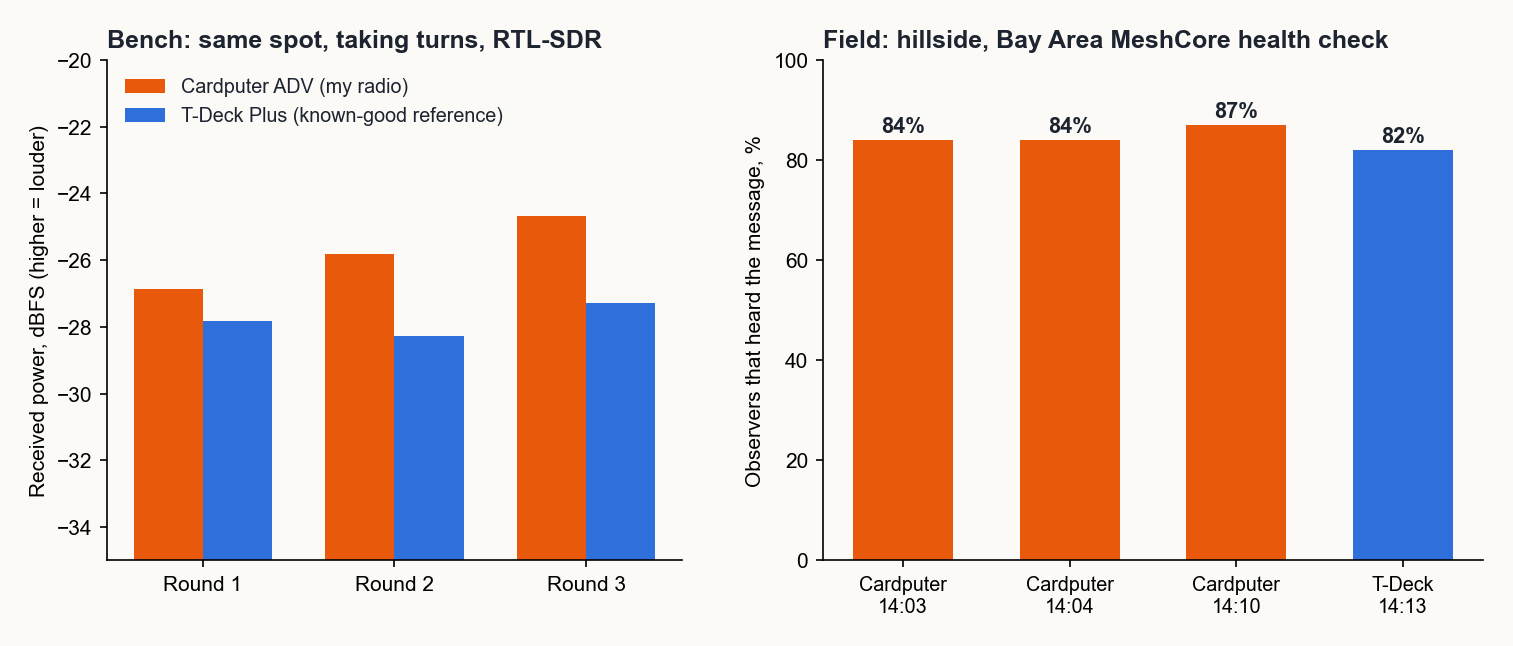 Left: with both radios on the same marked spot, taking turns, my Cardputer was never weaker than the known-good T-Deck. Right: from a hillside, both passed the Bay Area MeshCore health check easily. From home, roughly one send in three got through.
Same radio, same firmware, same antenna. The bug was my house.
The fix, cheapest first
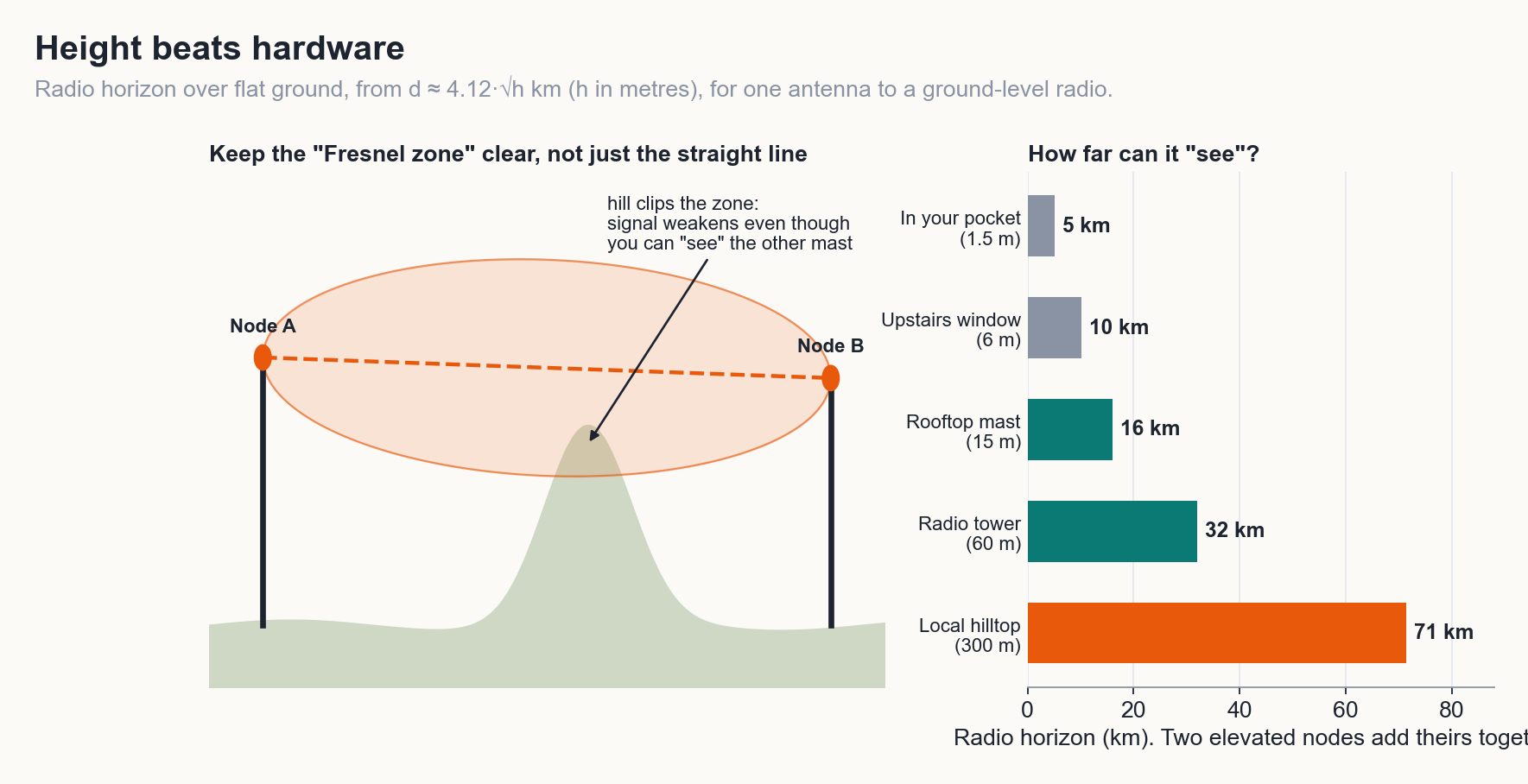 At these frequencies, radio waves travel more or less in a straight line. Every foot of height pushes your horizon farther out.
- Measure, don't guess. Most MeshCore apps can run a discovery, which asks nearby repeaters to reply, and some show the signal both ways. If repeaters hear you at −10 dB SNR while you hear them at +3 dB, you've found your imbalance. Use your region's health check if it has one.
- Test several times from one spot. Conditions swing from minute to minute. I once had the identical setup succeed on one run and fail completely on the next. One send tells you nothing. Five tell you something.
- Upgrade the antenna. Stock antennas are decorative. My $12–15 Muzi Works 915 MHz whip took me from hearing nothing indoors to seeing a repeater within minutes.
- Move it. A windowsill beats a desk, upstairs beats downstairs, and a balcony beats both. Point at the hills where the repeaters live, and get the antenna outside if you can: walls and low-E coated windows eat several dB.
- Upgrade to a higher-power radio. One-watt LoRa radios don't cost much more. RAK's WisMesh 1W Booster Starter Kit is sold for Meshtastic but runs MeshCore once you flash it. A big amplifier plus a big antenna can quickly take you past the legal limit, though. In the US, FCC Part 15.247 allows 1 W into the antenna, and above 6 dBi of antenna gain you must turn the power down dB for dB: 36 dBm EIRP in total.
- Put a node where the signal is. If your home is a dead zone, put a second radio with a better antenna on the balcony or roof, and pair to it over Bluetooth from indoors. Or, with your local group's blessing, put up a repeater. It's the most useful thing you can do for everyone.
Sidebar: What Could Possibly Go Wrong?
One company makes the magic chirp. Nearly every LoRa radio runs Semtech silicon or a licensed copy. That's a supply risk, not a kill switch: the firmware is open source, and nobody can switch your radio off remotely. A movement against centralized infrastructure that depends on one chip supplier. Irony noted.
License-free isn't rule-free. ISM bands have power limits, and unlicensed users get no protection from interference. Your "I'm okay" has no more right to the airwaves than your neighbor's weather station.
Encrypted doesn't mean invisible. Public and #hashtag channels are readable by anyone, and adverts can carry your location. Leave location sharing off, especially if your bug-out cabin is a secret.
Repeaters are volunteers. Coverage depends on other people's rooftops and batteries. Treat the mesh as one layer of your comms plan: two is one, and one is none.
8. What's Next
My next experiments
- A 1-watt booster or a repeater. A RAK booster board with a directional patch antenna, so I can hear well and be heard. And if I get a repeater up, I can help our local coverage too.
- Try out Meshtastic. A proper side-by-side of the two meshes, on the same hills.
The dark horse: Reticulum
Reticulum isn't a mesh app but a whole cryptographic network stack that runs over LoRa, Wi-Fi, packet radio, the internet, or anything else that moves bytes. It takes config files and patience, and around the Bay I could barely find anyone on it. And no, it can't bridge MeshCore and Meshtastic; today that takes a gateway, a Raspberry Pi with one radio from each tribe.
The road ahead for mesh
- Bigger IDs, fewer collisions. MeshCore's move to 2- and 3-byte repeater IDs will make busy regional meshes easier to trace and debug.
- Friendlier devices. Every new keyboard radio with official MeshCore support removes the "now install this phone app" step for non-technical users.
The Bottom Line
MeshCore won't replace your phone. It's slow, text-only, and it works only because a few hundred neighbors put radios on their roofs. But that's rather the point: it's a network built by the people who use it, out of cheap radios and spare rooftops, and it keeps working when the expensive one doesn't. And when you can't get through, the answer is almost never in your settings. It's in the sky: go higher, see farther, and join the people already up there.
My T-Deck now lives in my go-bag, next to the lasagna. For the price of a takeout dinner, you can put one in yours that will, on the worst day of the year, still get the message through:
"We're fine. Bring water. And the lasagna."
Image credits
- Hero: Wio Tracker L1 Pro running MeshCore at DB0IL, Fabian Horst, CC BY 4.0
- RAK4631 MeshCore solar repeater at DB0IL, Fabian Horst, CC BY 4.0
- Bay Area MeshCore live map screenshot; map data © OpenStreetMap contributors, tiles by OpenFreeMap/OpenMapTiles
- Bay Area traffic chart: data from a Bay Area MeshCore member who runs nodes on both networks
- Cardputer and T-Deck Plus photos, SDR and health-check measurements: the author
- Diagrams (chirp spectrogram, star vs. mesh, range vs. speed, packet anatomy, message journey, flood vs. direct, line of sight): original illustrations made for this article

