I Built My Own "Muse Charm" on an ESP32 Stick: One Fast Brain, One Slow Brain
· 20 min read
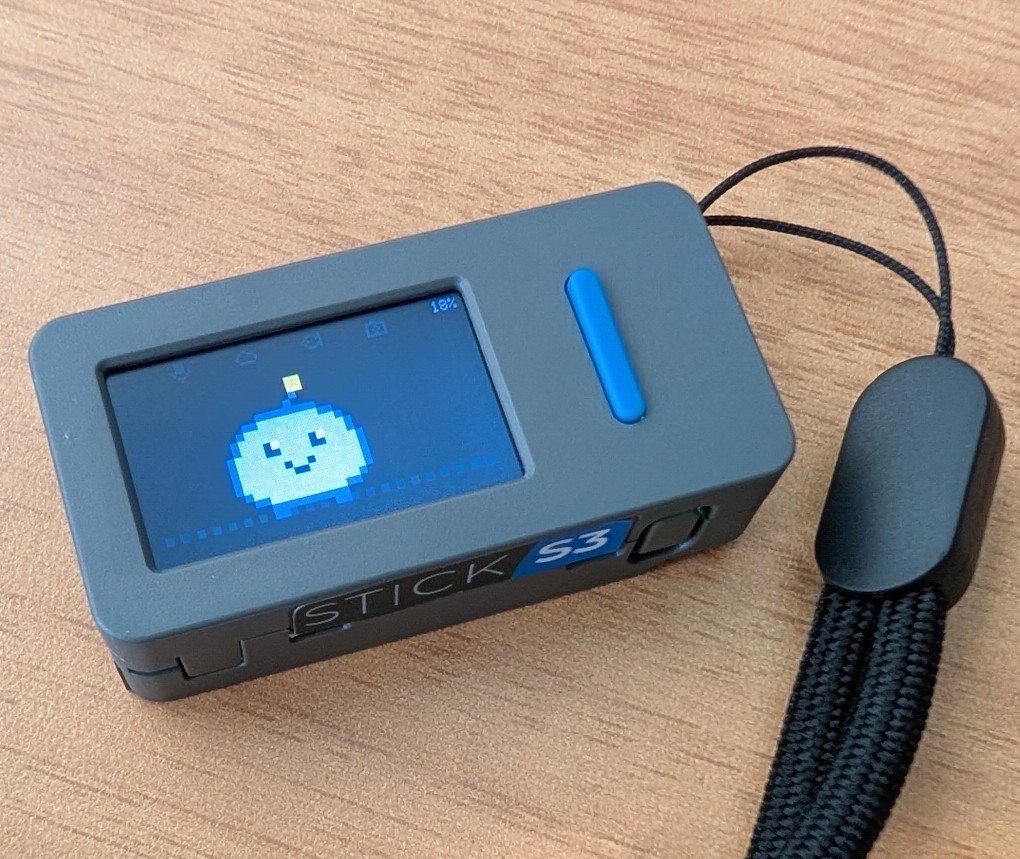 Kai on a real M5StickS3: clipped to a lanyard.
TL;DR:
- What it is: Kai is a push-to-talk AI pal on a charm-sized M5StickS3.
- Two brains: a fast path (Gemini Live, ~2 s spoken answers) handles most questions. A slow path (a locked-down Hermes Agent, 15–50 s) does research, memory and schedules, and Kai speaks the result when it lands.
- How routing works: the voice model's own tool choice decides the path, and an eval set keeps that choice honest.
- Size and material cost: 48 × 24 × 15 mm, 20 g, $21 for the stick, plus a home server
- Scale: a few days, about 4,800 lines of C++ and Python, (github.com/zbruceli/kai).
- Purpose of this article: lessons learned from building a real time AI voice device living on limited compute and power budget
A keychain charm that talks to an agent
In September, Meta launched Muse, its personal agent. Alongside it came the Muse Charm:
- a keychain device with a fingerprint sensor, a microphone and a tiny screen;
- a Tamagotchi-like avatar on that screen;
- approvals and payments bounced to your phone.
It ships in December.
The Charm's premise struck me: the agent lives in the cloud, the device is just a friendly way to reach it, and anything that needs reading or paying goes to a bigger screen. That's an architecture, not a product. So I asked a developer's question: how much of this can I build this week, with an off-the-shelf dev board and public APIs?
It turned out to be most of it, minus the fingerprint sensor and the payments, which I didn't want anyway. This post covers:
- the thought process and the use cases;
- the architecture;
- four design problems that decided everything: power, where the relay lives, the hybrid brain, and how to route between fast and slow.
Use cases: start from one person's day
I'm a photographer and an angler on the San Mateo County coast. The questions I actually ask while my hands are full are narrow and local:
| Ask | What Kai does |
|---|---|
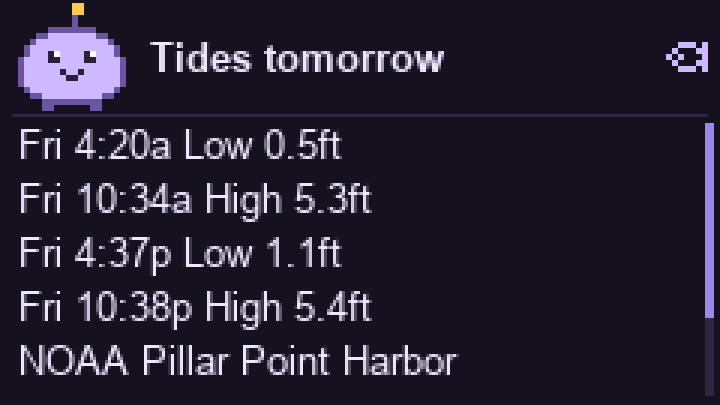
| "When's high tide at Pillar Point tomorrow?" | NOAA tide predictions, a card with highs and lows |
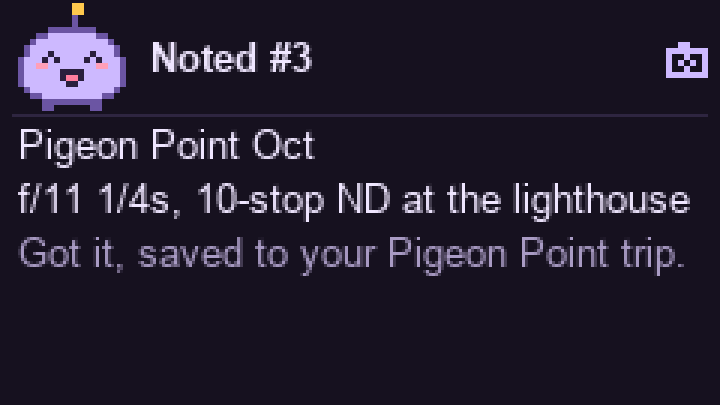
| "Note: f/11, quarter second, 10-stop ND at the lighthouse" | a trip note, filed under the current trip |
| "Research three sunrise spots near Half Moon Bay for this weekend, tell me later" | a background task; the answer is spoken ~45 s later |
| "Remind me at 5:30 to pack the ND filters" | a reminder; the Stick wakes itself at 5:30 |
| "Tell me if the wind at Half Moon Bay drops under 10 mph this weekend" | a watch that checks every few hours and speaks once |
The surprise came from the logs: over four days, fewer than one in six real questions touched those niche tools. The rest were whatever came to mind:
- how long to boil ramen eggs;
- the next Starship launch;
- LeBron versus Kobe;
- what "moon drop" grapes are.
A pocket device gets asked everything. So general knowledge had to be excellent, and the specialised tools had to be reliable, not just present.
The hardware: M5StickS3
Kai runs on an M5StickS3, M5Stack's newest "Stick" dev kit. It costs about $21 and needs no soldering: everything a voice gadget needs is already in the case. The Stick family got famous among developers this spring as the reference hardware for Anthropic's open-source Claude Desktop Buddy, a little desk pet that wakes up when a Claude session starts and lets you approve or deny its permission prompts with a button press. Kai asks its newer sibling to do more: listen, talk back, and live on a keychain.
| Part | What's inside | How Kai uses it |
|---|---|---|
| SoC | ESP32-S3 (dual-core Xtensa LX7, 240 MHz), 2.4 GHz Wi-Fi, BLE 5 | Opus encode/decode, WebSocket to the relay |
| Memory | 8 MB flash, 8 MB octal PSRAM | a 2 MB speaker ring; recording before Wi-Fi is up |
| Display | 1.14" ST7789 LCD, 240×135 | pixel face, captions, five-line cards |
| Audio | ES8311 codec, MEMS mic, AW8737 amp, 1 W speaker | push-to-talk in, Kai's voice out |
| Input | two buttons | hold the front button to talk |
| Power | 250 mAh LiPo, M5PM1 power chip, USB-C | rail measurements, power gating, RTC timer wake |
| Extras | BMI270 IMU, IR TX/RX, Grove port, Hat2 header | unused so far |
| Size | 48 × 24 × 15 mm, 20 g | clips to a lanyard or a bag |
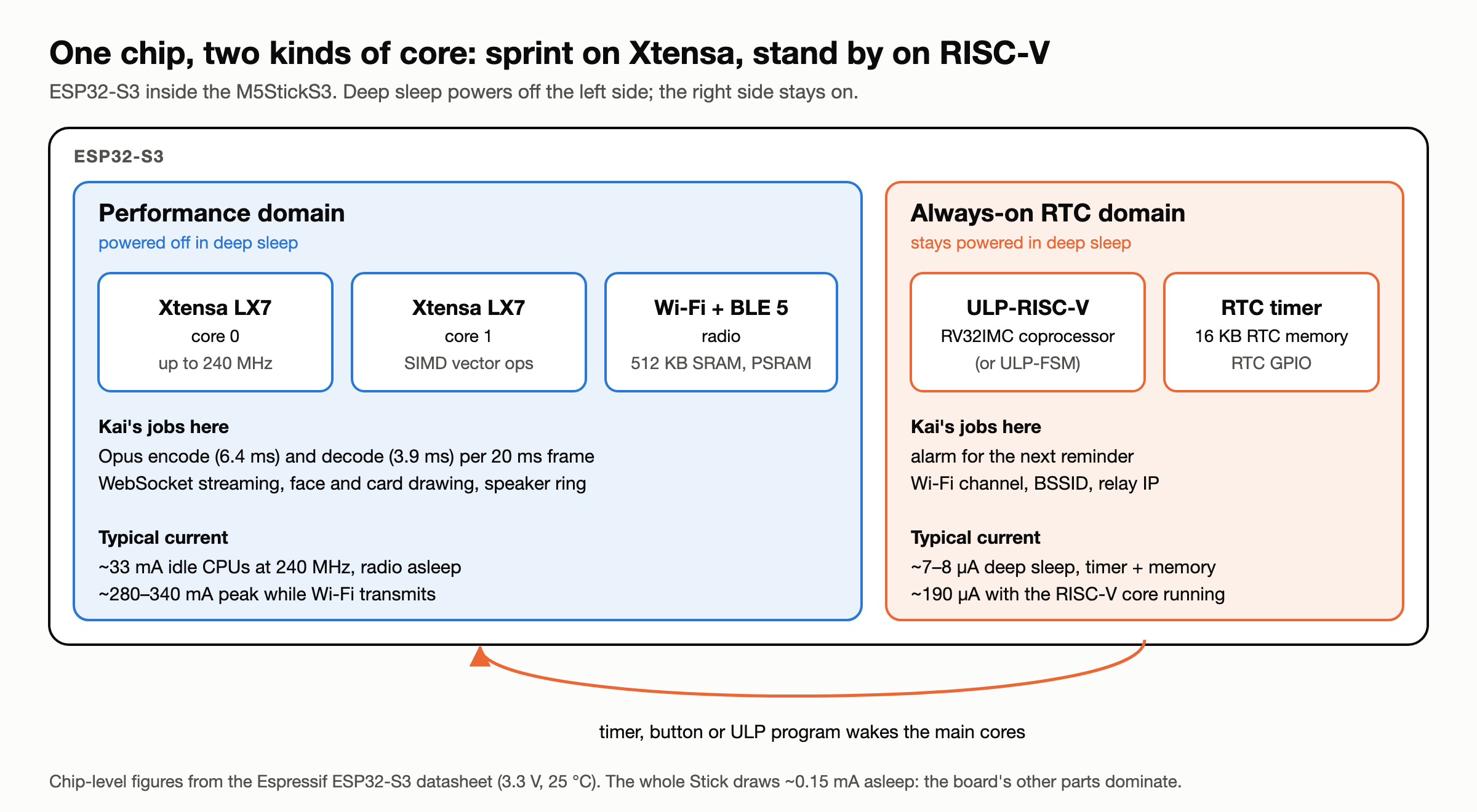
Two kinds of core, for two kinds of time. The ESP32-S3 pairs two very different processors. For the few seconds you're talking, two Xtensa LX7 cores run at up to 240 MHz, with vector instructions to spare. That's enough to encode a 20 ms Opus frame in 6.4 ms while the radio streams. For the other 23-odd hours of the day, those cores, the radio and main memory are switched off. What stays on is a tiny always-on corner of the chip: an RTC timer, 16 KB of RTC memory, and a RISC-V ultra-low-power (ULP) coprocessor that can run its own small program with the main cores asleep. The gap between the two sides is huge: roughly 300 mA while Wi-Fi transmits, and 7–8 µA asleep with only the timer and RTC memory powered, a ratio of about 40,000 to 1. Kai uses the always-on side today as an alarm clock and a notepad: the RTC timer wakes it for the next reminder, and RTC memory keeps the Wi-Fi channel, BSSID and relay IP so the reconnect skips the scan. The RISC-V core is the headroom: at ~190 µA it could watch the buttons or the IMU and wake the big cores only when something happens, without ever starting Wi-Fi.
Why this board and not a bare ESP32:
- The audio chain is done. A codec, a mic and an amplified speaker on one board means no I2S wiring and no breadboard. Day one went on the protocol, not the hardware.
- PSRAM is the quiet hero. 8 MB is room for a deep audio buffer, which is what smooths out Gemini's bursty playback and lets you talk while Wi-Fi is still reconnecting.
- The power chip is programmable. It reports rail voltages and currents, which made the power budget below possible, and it can cut power to the screen and audio in deep sleep.
- It's already a product shape. Case, battery, charging and a lanyard hole: it passes for a keychain gadget without a 3D printer.
What it doesn't have matters just as much: no fingerprint sensor, no cellular, no GPS, and no Bluetooth Classic, so no headset profiles. Those gaps shaped the design as much as the parts did.
Constraints first
Each of the Stick's limits forced a decision:
| Constraint | Consequence |
|---|---|
| Voice in, voice out; tiny screen; no keyboard | Answers are one to three spoken sentences plus a five-line card |
| ~225 mAh usable | The device deep-sleeps between uses, so nothing can push to it |
| Realtime voice must feel instant | Slow work is asynchronous: acknowledge now, deliver later |
| No fingerprint sensor | No payments or side effects without a deliberate confirmation (deferred) |
The design rule that fell out: voice first, glance second, everything else somewhere else.
Architecture: a thin device, a relay, two brains
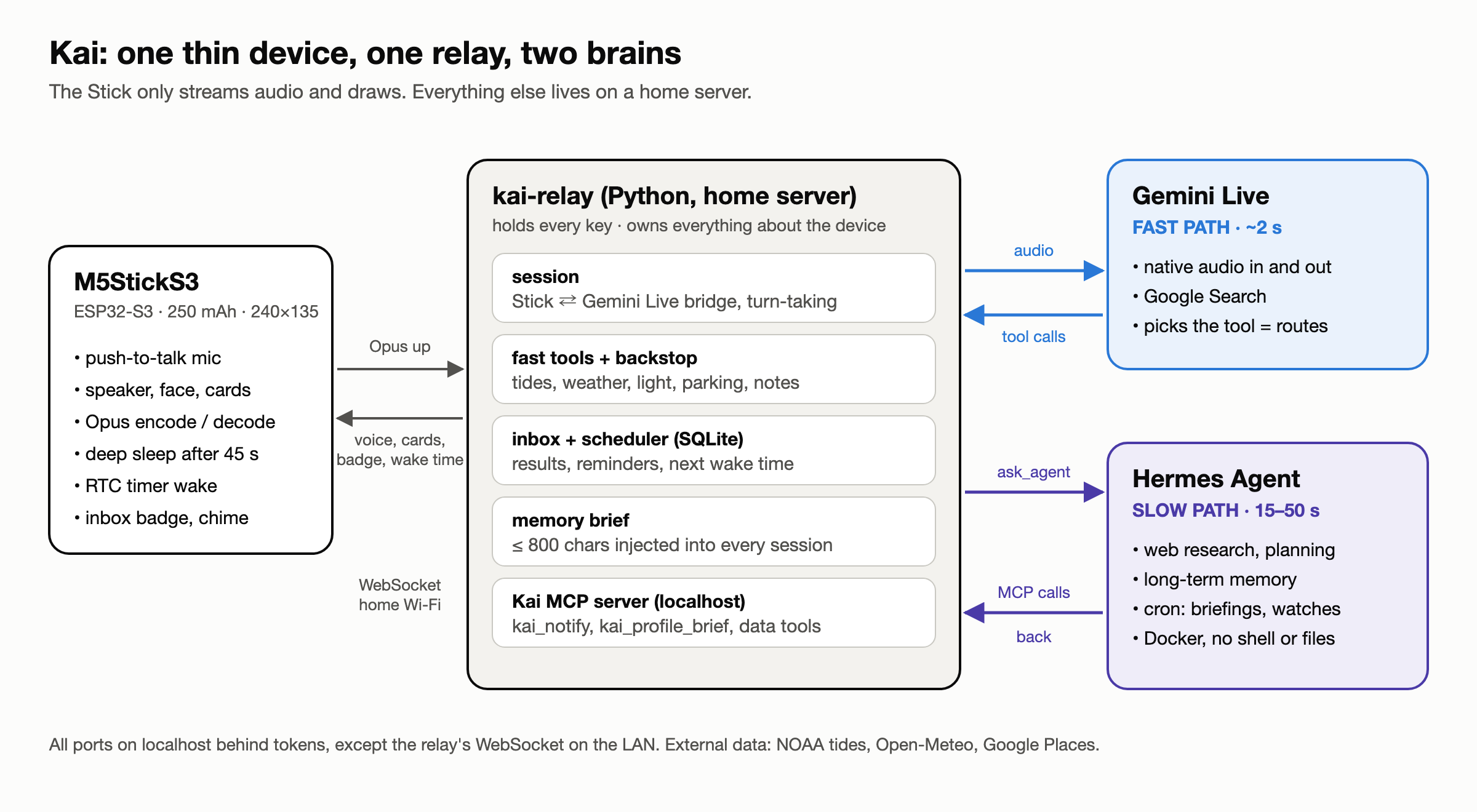
The Stick is deliberately dumb.
- It streams Opus audio over a WebSocket while the front button is held.
- It plays back Kai's voice, draws a pixel face and cards, and deep-sleeps after 45 s.
- It holds one secret, a device token. No API keys live on the device.
The relay is where everything lives. It's a Python service on an always-on box at home.
- It bridges the Stick to Gemini Live (native audio in and out, with Google Search).
- It runs Kai's own tools, and keeps the inbox, the scheduler and the memory brief.
- It hands slow work to Hermes Agent.
Keeping the logic off the device paid for itself on day one: every prompt tweak and new tool shipped with a git pull on the server, not a reflash.
The wire protocol is small:
| Direction | Message |
|---|---|
| Stick → relay | hello {fw, battery, codecs, wake}, ptt_start, binary Opus, ptt_end |
| relay → Stick | binary Opus, caption, card {title, lines}, state, turn_complete |
| relay → Stick | inbox {count}, schedule {wake_in_s}, nudge |
Tools are plain async functions. Gemini gets the declaration. The relay sends the data back to Gemini and the card to the screen:
@tool(
    "get_tides",
    "High and low tide times near a place from the nearest NOAA station (US coasts). Call it for every "
    "tide question, including repeats and follow-ups: it refreshes the card on screen.",
    {"place": {"type": "STRING", "description": "Beach, harbor, pier or town. Omit for home."},
     "day": DAY_PARAM},
)
async def get_tides(ctx: ToolContext, place: str | None = None, day: str | None = None) -> ToolResult:
    ...
Two early lessons shaped every tool after that:
- Never let the model do date arithmetic. Days are passed as spoken ("saturday", "day after tomorrow") and resolved on the relay, because Gemini's date arithmetic proved unreliable.
- Models skip tools. Sometimes Gemini answers a weather question from Search, with no tool call, so no card. The relay's backstop infers the call from the transcript and runs it itself. It fires about 4 times per 90 real questions.
| Weather, mid-answer | Tides | Saved note |
|---|---|---|
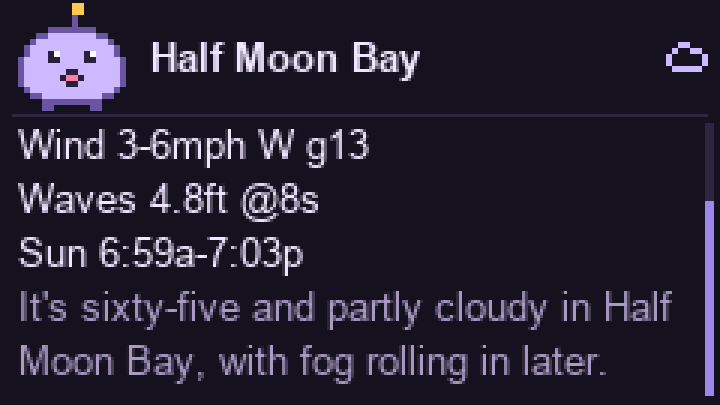 |  |  |
Consideration 1: power
A 250 mAh battery forces you to measure before you optimise. I built an estimated power budget from the power chip's rail measurements and component datasheets. It found something I didn't expect:
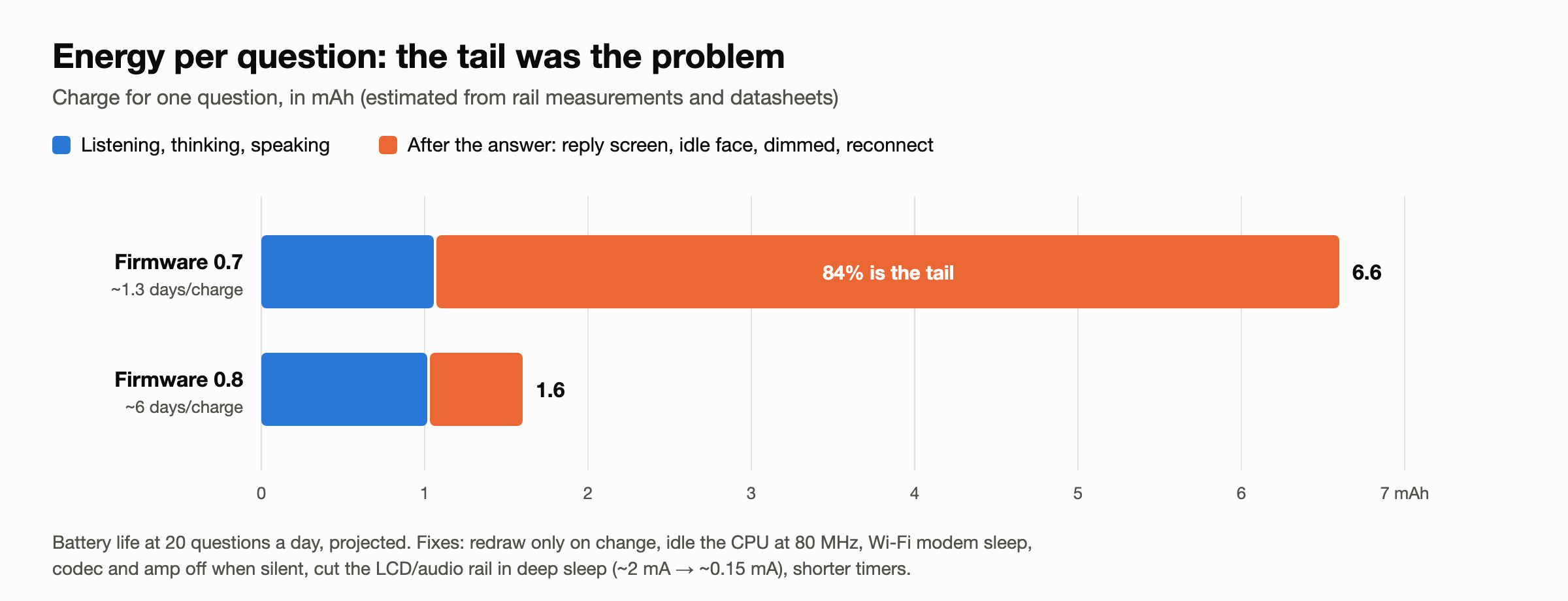
The conversation was cheap. The tail was not. After each answer, the device kept the reply screen lit with Wi-Fi awake, then idled, then dimmed, then finally slept. That tail was 84% of each question's charge, and the idle loop was redrawing a full frame at 30 fps, spending half its time drawing nothing new.
The fixes were mundane and effective:
- redraw only on change;
- let FreeRTOS idle the CPU at 80 MHz;
- Wi-Fi modem sleep whenever no audio streams;
- codec and amp off when silent;
- cut the LCD/audio power rail in deep sleep (~2 mA → ~0.15 mA);
- shorter timers.
The result: projected battery life at 20 questions a day went from ~1.3 days to ~6 days.
Then Opus: switching the audio from raw PCM (256 kbit/s up, 384 kbit/s down) to Opus (~24 up, ~32 down) cut Wi-Fi airtime about 11–12×.
- On the ESP32-S3 at 240 MHz, encoding takes 6.4 ms per 20 ms frame, and decoding 3.9 ms.
- One gotcha: Gemini sends speech 3–4× faster than real time. Decoding every packet on arrival starved the speaker task. Queueing packets compressed and decoding them just in time fixed the stutter: zero underruns.
Waking fast matters as much as sleeping well:
- The Wi-Fi channel, BSSID and relay IP are kept in RTC memory, so reconnecting skips the scan.
- Holding the button while it wakes records straight into PSRAM, so you can press and talk from deep sleep without waiting for Wi-Fi.
Consideration 2: where the relay lives
I seriously considered three places for the relay:
- The phone, as a BLE bridge.
- The ESP32-S3 has BLE 5 but no Bluetooth Classic, so there are no headset profiles; audio has to travel as data. Opus fits comfortably in BLE bandwidth.
- iOS suspends background apps, so the phone app has to stay a thin byte-mover rather than the brain.
- The phone would also bring real GPS for "near me".
- A cloud droplet. Reachable anywhere, but it means TLS on the device, a public endpoint, and another thing to secure.
- A home server on the LAN. Zero exposure,
ws://on a trusted network, and a box I already run.
I chose local first, remote later. The architecture doesn't care: the phone bridge (Stick → BLE → phone → tunnel → the same relay) only adds a transport. Keeping the brain in one Python process means every tool exists once, not three times in Python, Kotlin and Swift.
Consideration 3: the hybrid brain
A realtime voice model is superb at conversation and terrible at waiting. A Gemini Live function call blocks the turn, so "research three sunrise spots" can't run inside it. Kai needed a second brain for slow work, memory and schedules.
I compared three routes:
- grow the relay into an agent myself: memory, task runner, cron, approvals; roughly 20+ days;
- put OpenClaw behind it: the biggest ecosystem, but a Node stack, and a skills marketplace with a documented malware problem;
- use Hermes Agent (Nous Research, MIT, Python), which already has memory, cron, background runs and approval gates.
I chose Hermes, and locked it down hard:
- pinned Docker image (tag and digest), with only its own data folder mounted;
- terminal, file, code-execution, browser and computer-use toolsets disabled;
- approvals manual, unattended actions denied, self-written skills need approval;
- API and MCP both on localhost, behind tokens.
A red-team prompt asking it to read ~/.ssh found no tool to do it with.
Integration is two one-way pipes:
- Relay → Hermes:
POST /v1/runsstarts a background run with a voice-shaped instruction. The reply must be JSON:speak(at most two sentences), acard, anddetails_md. - Hermes → relay: Hermes is an MCP client, so the relay runs a small MCP server on localhost.
kai_notifydelivers a result;kai_profile_briefupdates what Kai knows about me;- Kai's own tide, weather and light tools are exposed read-only, so Hermes doesn't re-scrape the web with worse data. It once answered sunrise from a web page (7:33) when Kai's tool said 7:03. Job prompts now require Kai's tools.
The key trick is how results come back. ask_agent returns immediately, and Kai says "On it." When the run finishes, the relay injects the result into the live voice session as a text turn, queued so it never talks over you:
await self._send({"type": "nudge"})  # two-note chime: news you didn't just ask for
await self._live.send_client_content(
    turns=types.Content(role="user", parts=[types.Part(text=(
        "[Background result for the owner, not something they just said. Tell them now in one or "
        f"two short spoken sentences, as your own news: {item.speak}]"))]),
    turn_complete=True,
)
If the Stick is asleep, the result waits in an inbox, and a yellow badge shows on the face the next time you pick it up.
Memory is a brief, not a database lookup.
- When a conversation ends, its transcript goes to Hermes.
- Hermes updates its long-term memory and sends back a profile brief of at most 800 characters.
- That brief goes into the system prompt of every new session. Facts about me cost zero tool calls;
recallcovers anything older, with an 8-second budget before it falls back to the inbox.
Time is where the sleeping device bites. Nothing can push to a Stick in deep sleep. So:
- the relay owns every reminder;
- it tells the Stick when the next thing is due;
- the Stick sets its RTC timer before it sleeps.
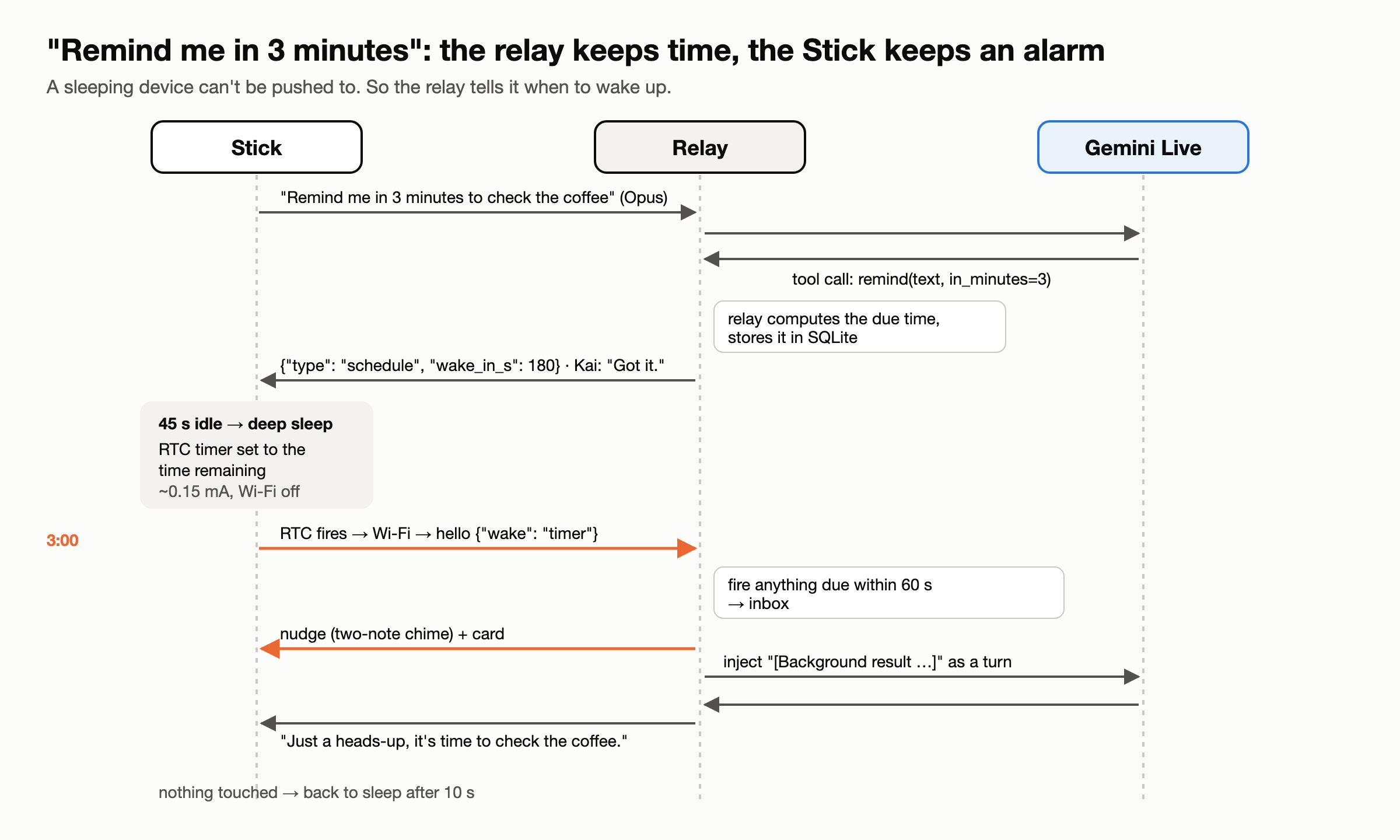
- Reminders are the relay's own. They need no LLM when they fire.
- Briefings ("every Saturday at 5:45, a fishing brief") and watches ("tell me if the wind drops") are Hermes cron jobs.
- A watch replies
[SILENT]until its condition holds, then callskai_notify(watch=…), and the relay deletes the job. - Watches never wake the Stick between 22:00 and 07:00.
- A watch replies
Consideration 4: fast or slow?
This is the most interesting design question in the project. You have ~2 seconds on one path and ~25 seconds on the other. Who decides, and how?
The option I rejected: a router in front. Keyword rules, an embedding classifier or a small model would decide before the answer starts. Those fit text pipelines. With native audio there's no transcript until the turn ends, so a gate in front adds latency to every question to save a few.
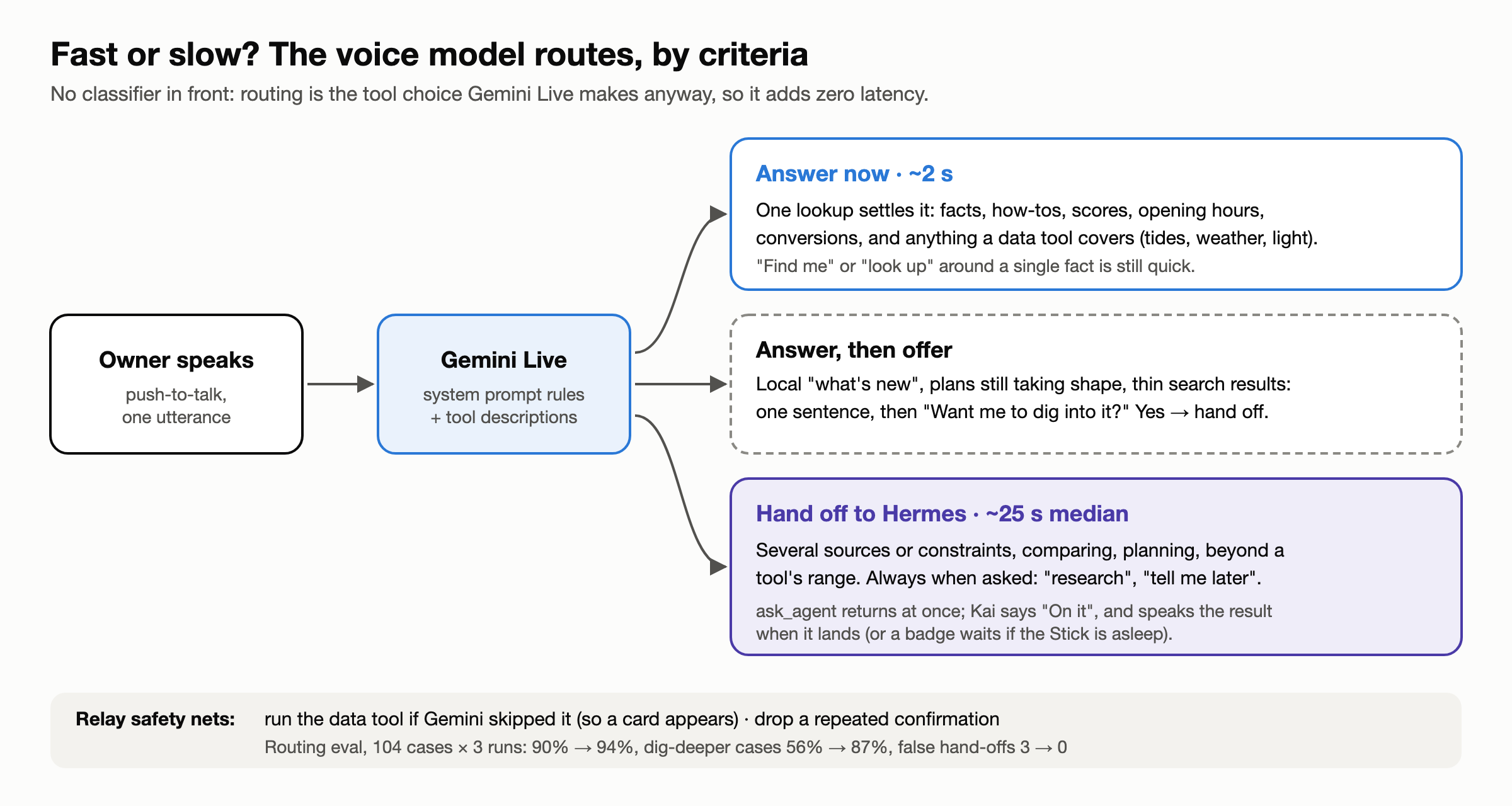
What Kai does instead: the voice model is the router. ask_agent is just another tool, and choosing a tool is something Gemini Live does anyway. That costs zero added latency. The work goes into making that choice well-informed, and measurable.
Version one used trigger words ("research", "look into", "later"). The logs graded it:
- Precise: 9 of 9 explicit requests went to the slow path, and nothing went there by mistake.
- But timid: a hard question without a trigger word got a confident, thin answer. Twice, I asked a fast question ("new restaurants downtown?", "Starship flight objectives?"), got one sentence, and asked again with "tell me later".
- And the slow path isn't slow: 15–49 s, median ~24 s.
Before touching the prompt, I built an eval:
- The cases: the ~76 real utterances from the logs, hand-labelled, plus 28 synthetic cases for tool collisions and false-positive traps ("find me the capital of Australia" must stay fast).
- The harness: it replays each one through a real Gemini Live session with the relay's exact prompt and tools, as text, and records the first decision:
fast,tool:<name>,slow,offerorclarify. Three runs per case, because the same prompt routes differently from run to run.
Then I changed the rules from words to criteria:
- Answer now when one lookup settles it.
- Hand off when a good answer needs several sources or constraints, comparing, planning, or goes beyond a tool's range. Always hand off when explicitly asked.
- A third route: answer, then offer. For local "what's new", plans still taking shape, or thin search results, Kai says the best it found in one sentence and asks "Want me to dig into it?". "Yes" hands off, with the question and the quick answer as context.
| 104 cases × 3 runs | Before | After |
|---|---|---|
| Overall | 90% | 94% |
| Needs digging deeper (slow or offer) | 56% | 87% |
| Explicit "research / tell me later" | 94% | 100% |
| Quick facts wrongly sent slow | 3 | 0 |
The eval earned its keep in the first iteration. My first draft raised accuracy, but it introduced a worse failure. Twice, Kai said "I'm looking into those road closures for you" without calling the tool. That's a promise with nothing behind it. One hard rule fixed it: "never say you're looking into something without calling ask_agent: nothing happens unless you call it". Without the eval, I'd have shipped a Kai that occasionally lies about doing work.
Some fixes don't belong in the prompt at all. Gemini Live sometimes confirmed a reminder twice: once around the tool call, and again when the result came back. No wording reliably stops that, so the relay does: after a successful action tool and one spoken confirmation, it drops any further turn Gemini starts before you speak again. Use the prompt for judgement, and code for invariants.
The final implementation
- Firmware (C++, PlatformIO, ~1,700 lines):
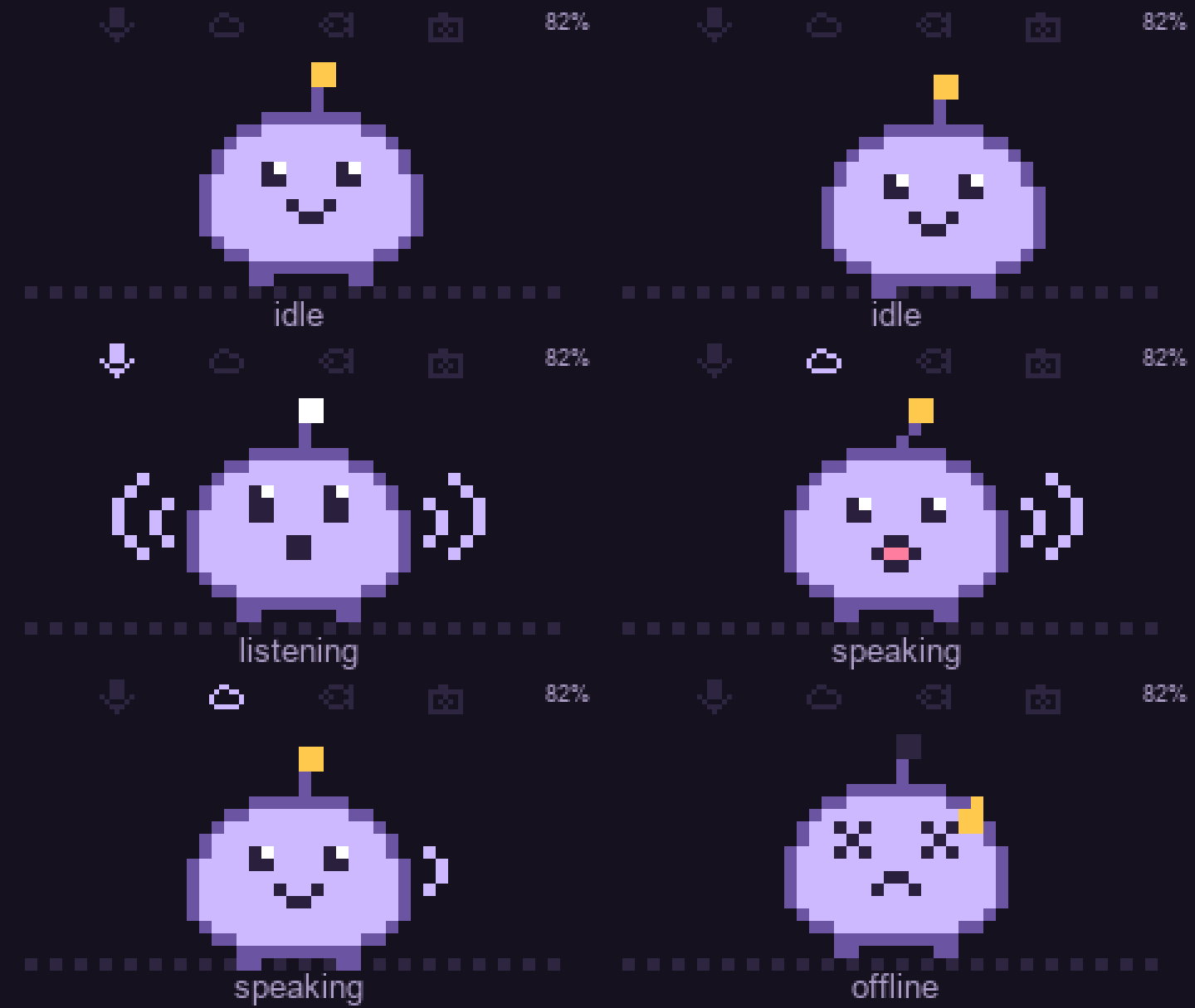
- modes Offline → Idle → Listening → Thinking → Reply;
- Opus through libopus at complexity 1;
- a 2 MB PSRAM speaker ring;
- a 20×18 pastel sprite with seven moods;
- inbox badge, chime, RTC timer wake.
- Relay (Python, uv, ~3,100 lines):
- the Live session bridge and tools;
- the backstop;
- the inbox, scheduler, and Hermes client;
- the MCP server;
- the routing eval.
- Hermes: one pinned container on the same box, reached only through localhost.
Lessons worth stealing
- Measure the tail, not the task. In battery devices, the time after the work usually costs more than the work.
- Keep the device thin, and the brain in one place. One implementation of every tool, keys never leave the server, and prompt changes ship without a reflash.
- Let the realtime model route, but give it criteria, not keywords. Then build an eval from your own logs before changing anything.
- Async by default for slow work. Acknowledge, return immediately, and deliver later into the same conversation, or into an inbox if the device is asleep.
- Guard invariants in code. Model behaviour drifts between runs; a relay-side check doesn't.
What's next
- A richer interface. Voice and a tiny screen are only two of the ways to talk to a pocket device. The Stick already has a motion sensor, IR and a second button sitting unused: shake to dismiss, tilt to scroll a card, a raise-to-talk gesture, or a haptic buzz instead of a chime when you're somewhere quiet.
- Kai away from home. The relay lives on my LAN, so Kai goes quiet once I leave Wi-Fi range. A secure tunnel to the home server, over a phone hotspot or a phone BLE bridge, would take Kai to the beach and the harbor without exposing the relay to the internet.
- A little more trust for Hermes. Today Hermes can research, remember and schedule, and nothing else. The next step is to open it up, carefully, to more of my personal digital life: calendar, email triage, photo-trip planning. Every side effect goes through a spoken read-back and a deliberate long press first.
- A reflex layer. A new class of decision models, like TypeSafe AI's Jev and OpenAI's Decisions API launched this week, returns a choice from a fixed set of answers in a fraction of a second. That's exactly what Kai needs for fast routing decisions. I expect Google to bring similar support to the Gemini Live API.
The Muse Charm will ship with a fingerprint sensor, a payments stack and Meta's cloud behind it. Kai has a 20-gram dev board, a home server and two brains that know their jobs. For a pocket pal that answers the questions I actually ask, that's been enough. And Kai costs $21, you can mod it however you want, and you don't have to wait for December.
Code: github.com/zbruceli/kai (MIT).